Comparing JSON Config Files Across Environments
How to compare JSON config files across dev, staging, and production environments — spot drift, missing keys, and wrong values before they cause incidents.
Configuration drift is one of the quietest ways things break in production. Your dev config has debug: true and ssl: false. Production has the opposite — or should. When those files diverge silently over months of incremental changes, you end up with a database pool size of 5 in production, a feature flag enabled in dev but disabled in prod, or rate limiting turned off because someone copied the dev config and never updated it.
Comparing JSON config files across environments catches these problems before they cause incidents. This post covers how to do it — from a quick manual diff to an automated drift check that runs in CI every time a config changes.
TL;DR: Paste your dev and production config into GoGood.dev JSON Compare to see every difference highlighted immediately. For command-line comparison:
diff <(jq --sort-keys . dev.json) <(jq --sort-keys . prod.json).
What config drift looks like
Config drift happens gradually. A developer adds a new feature flag to the dev config, forgets to add it to production. Someone bumps the database pool size in staging but not dev. A hotfix changes a timeout value in production but the change never makes it back to the base config in the repo.
After six months, a typical config.json across three environments looks like this:
// dev.json
{
  "app": { "port": 3000, "debug": true, "log_level": "debug" },
  "database": { "host": "localhost", "pool_size": 5, "ssl": false },
  "features": { "new_dashboard": true, "billing": false },
  "rate_limit": { "enabled": false }
}

// prod.json — spot the differences
{
  "app": { "port": 8080, "debug": false, "log_level": "warn" },
  "database": { "host": "db.prod.internal", "pool_size": 20, "ssl": true },
  "features": { "new_dashboard": false, "billing": true },
  "rate_limit": { "enabled": true, "requests_per_minute": 100 }
}
Some of these differences are intentional (debug, host, ssl). Others might not be — new_dashboard: true in dev but false in prod could mean a feature is being tested locally but was never deployed, or it was deployed to prod and someone disabled it without updating dev. Without a comparison, you can’t tell which.
How to compare JSON config files
Online (fastest for ad hoc comparison)
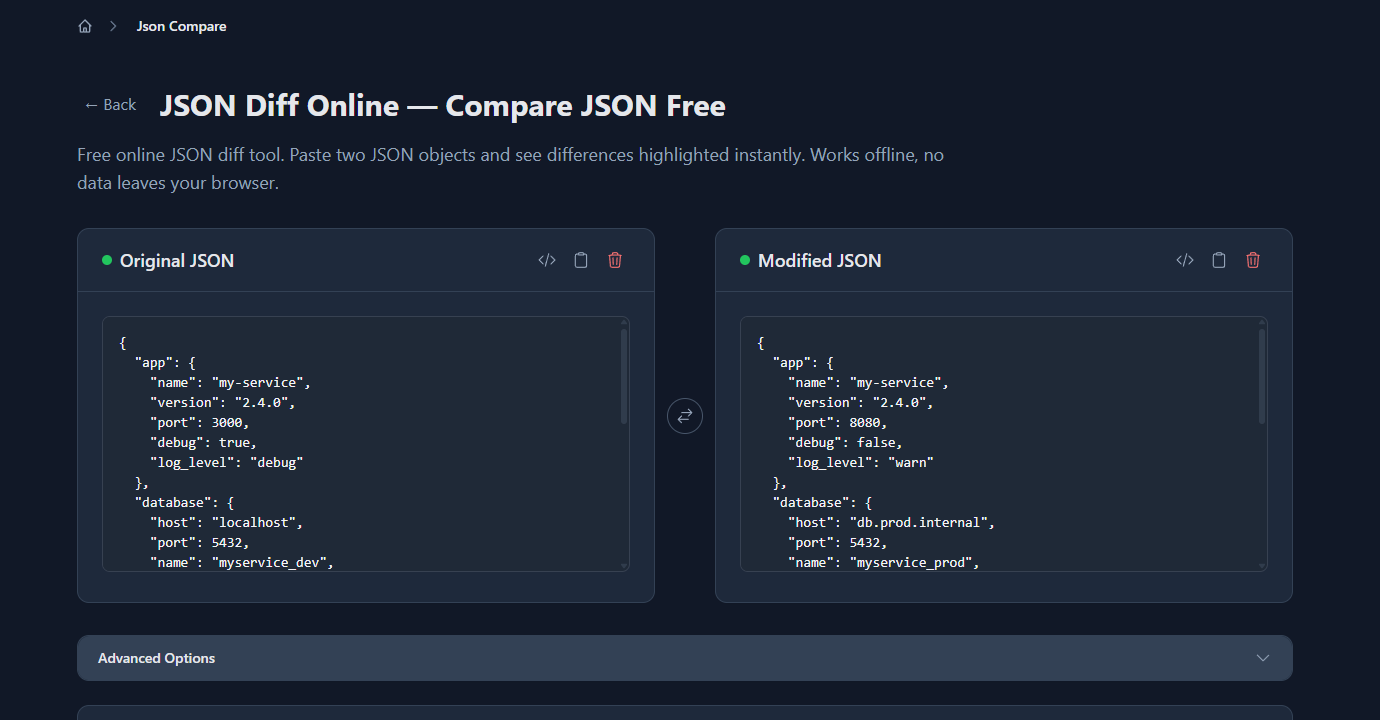
Paste your two config files into GoGood.dev JSON Compare. Put dev on the left, production on the right:
Every difference is highlighted: changed values in yellow, fields only in one config in red/green. This immediately shows you which differences are structural (a key exists in one environment but not the other) vs value differences (same key, different value):
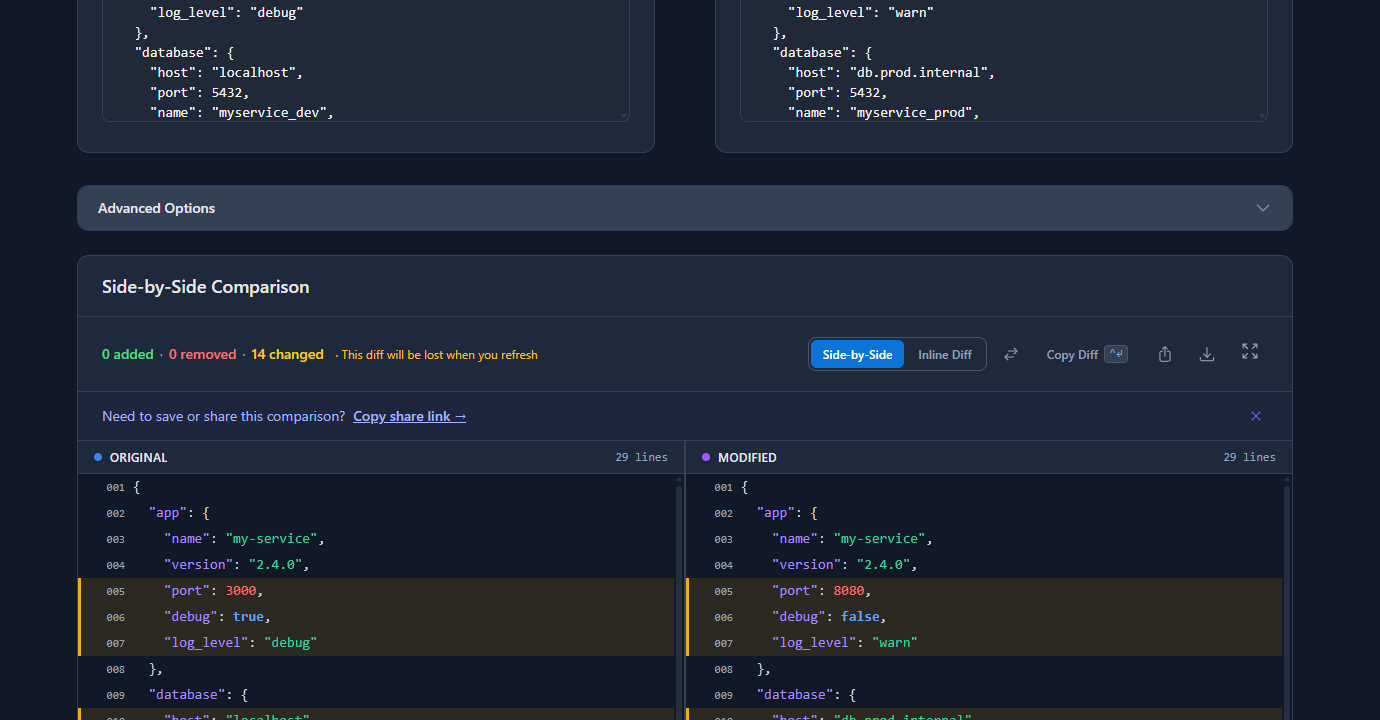
This view is useful for a quick audit — you can see at a glance whether the structural shape matches (same keys in both) and which values differ intentionally vs accidentally.
Command line with jq + diff
For scripting or CI integration, jq and diff handle this cleanly:
diff \
  <(jq --sort-keys . dev.json) \
  <(jq --sort-keys . prod.json)
--sort-keys normalises key ordering so the diff only shows semantic differences. Output looks like standard unified diff — lines starting with - are only in dev, lines with + only in prod.
For more readable output with context:
diff --unified=3 \
  <(jq --sort-keys . dev.json) \
  <(jq --sort-keys . prod.json)
Comparing specific sections
If you only care about one part of the config — say, the features flags — extract it first:
diff \
  <(jq --sort-keys '.features' dev.json) \
  <(jq --sort-keys '.features' prod.json)
This is useful when you know the database config differs intentionally and you only want to check whether feature flags are aligned across environments.
Three-way comparison (dev, staging, prod)
For three environments, compare them pairwise:
# Dev vs staging
diff <(jq --sort-keys . dev.json) <(jq --sort-keys . staging.json)

# Staging vs prod
diff <(jq --sort-keys . staging.json) <(jq --sort-keys . prod.json)

# Dev vs prod (summary view)
diff <(jq --sort-keys . dev.json) <(jq --sort-keys . prod.json)
The dev→staging diff catches features enabled in dev that haven’t reached staging. The staging→prod diff catches anything that passed staging review but didn’t make it to production.
What to look for in the diff
Not all differences are problems. The goal is to categorise each difference as expected or unexpected.
Expected differences (document these):
host,port,database.name— environment-specific infrastructure valuesdebug,log_level— verbosity settings appropriate per environmentssl— typicallyfalsein local dev,truein production
Unexpected differences (investigate these):
- A key exists in dev but is missing in prod — either it was added to dev and never deployed, or it was removed from prod and not from dev
- A feature flag set differently across environments with no corresponding deploy note
- A numeric value that differs without explanation (
pool_size: 5in prod is almost certainly wrong if staging has20) - A timeout or rate limit set to a permissive value in production that should be restrictive
Create an environments.md or a comment block in your config documenting which differences are intentional. Then when you run a comparison, the unexplained differences stand out.
Automating config drift detection
Once you’ve established what your configs should look like, automate the check so drift gets caught immediately when someone changes a file.
Save a schema of expected keys:
Instead of comparing full values (which differ legitimately), compare just the key structure — whether the same keys exist in all environments:
# Extract just the key paths from each config
jq '[path(..)] | map(join("."))' dev.json | sort > dev-keys.txt
jq '[path(..)] | map(join("."))' prod.json | sort > prod-keys.txt

diff dev-keys.txt prod-keys.txt
This flags structural drift (missing or extra keys) without flagging value differences.
CI check for missing keys:
#!/bin/bash
# scripts/check-config-drift.sh

DEV_KEYS=$(jq --sort-keys 'keys' config/dev.json)
PROD_KEYS=$(jq --sort-keys 'keys' config/prod.json)

if [ "$DEV_KEYS" != "$PROD_KEYS" ]; then
  echo "❌ Config key mismatch between dev and production:"
  diff <(echo "$DEV_KEYS") <(echo "$PROD_KEYS")
  exit 1
fi

echo "✅ Config keys match across environments"
Add this to your CI pipeline on a path trigger — run it whenever any config file changes:
# .github/workflows/config-check.yml
on:
  push:
    paths:
      - 'config/**/*.json'

jobs:
  config-drift:
    runs-on: ubuntu-latest
    steps:
      - uses: actions/checkout@v4
      - name: Check config drift
        run: bash scripts/check-config-drift.sh
Now any PR that adds a key to one config but not the others fails immediately.
Common problems when comparing config files
“The diff shows hundreds of lines but most are just key ordering”
JSON doesn’t guarantee key order. If your configs were generated by different tools or edited by different people, the keys may be in different sequences even though the content is identical. Always use jq --sort-keys before diffing to normalise the order.
“Values are environment-specific but I still want to check they’re all present”
Separate structure from values in your check. Use jq '[paths]' to extract all key paths from each config, then compare the paths rather than the full files. This confirms every config has the same keys without flagging legitimate value differences.
“Our config has secrets — I can’t paste it into an online tool”
Online tools like GoGood.dev JSON Compare run entirely in the browser — nothing is sent to a server. But if your security policy prohibits it regardless, use the jq + diff command-line approach locally. Alternatively, create a redacted copy of the config (replace secret values with "***") and compare those.
“Someone keeps changing prod config directly and the repo never gets updated”
This is a process problem, not a tooling problem — but a drift check in CI helps surface it. If prod config changes directly on the server (not through a deploy), the next CI run comparing the committed config against a live snapshot will catch the gap. Pair drift detection with a process rule: all config changes go through a PR.
FAQ
How do I compare JSON config files between environments?
The fastest approach is to paste both configs into an online JSON diff tool like gogood.dev/json-compare, which shows all differences highlighted side by side. For command-line comparison: diff <(jq --sort-keys . dev.json) <(jq --sort-keys . prod.json). Always use --sort-keys to avoid false positives from key ordering differences.
How do I check if a key exists in one config but not another?
Use jq '[path(..)] | map(join("."))' config.json | sort to extract all key paths from a config, then diff the two path lists. This shows structural differences (missing or extra keys) without comparing values, which is useful when values legitimately differ across environments.
What’s configuration drift and why does it matter?
Config drift happens when the configuration files for different environments (dev, staging, production) diverge over time without intention. A key added in dev but never deployed to production, or a value changed via hotfix in prod but never committed — these gaps cause bugs that are hard to diagnose because the code is identical and only the config differs.
How do I automate config file comparison in CI?
Extract the key structure from each config file with jq --sort-keys 'keys', compare them in a CI script, and fail the build if they differ. Run the check on any PR that modifies config files using a path trigger in GitHub Actions. This catches structural drift immediately rather than letting it accumulate.
Can I compare nested JSON configs, not just top-level keys?
Yes — jq '[path(..)] | map(join("."))' config.json extracts all nested paths (e.g., database.host, features.billing) not just top-level keys. Comparing these path lists across configs catches drift at any nesting depth.
Config drift is slow-motion configuration failure. The comparison takes a minute; diagnosing the production incident it prevents takes hours. Run it before every deploy that touches config files, and automate the structural check in CI so nothing slips through on a busy day.
For more on JSON comparisons in your workflow: How to Compare Two JSON Files Online covers the general diff workflow, and Why Your JSON Diff Tool Gives False Positives explains how to avoid key-ordering and whitespace noise in your comparisons.