Cron Expression Cheat Sheet for Developers
Cron expression examples for the most common schedules — every minute, hourly, daily, weekly, monthly — with syntax reference, gotchas, and a visual builder.
Cron syntax is one of those things you look up every single time. You know the five fields exist, you know * means “every”, but when you need “every weekday at 9 AM” or “first day of the month at midnight” you end up Googling the format again. Every developer does.
This is the reference page you keep open. It covers the cron expression syntax, the most common schedule patterns with real examples, the differences between standard cron and extended formats (like AWS EventBridge or GitHub Actions), and the mistakes that silently run your job on the wrong schedule.
TL;DR: The five fields are
minute hour day-of-month month day-of-week. Build and validate any expression at GoGood.dev Cron Builder — it shows the human-readable schedule and the next 5 run times.
Cron expression syntax
A standard cron expression has five space-separated fields:
┌───────────── minute (0–59)
│ ┌─────────── hour (0–23)
│ │ ┌───────── day of month (1–31)
│ │ │ ┌─────── month (1–12 or JAN–DEC)
│ │ │ │ ┌───── day of week (0–6, 0=Sunday, or SUN–SAT)
│ │ │ │ │
* * * * *
Special characters:
| Character | Meaning | Example |
|---|---|---|
* | every value | * * * * * — every minute |
, | list of values | 0 9,17 * * * — 9 AM and 5 PM |
- | range | 0 9 * * 1-5 — 9 AM, Mon–Fri |
/ | step | */15 * * * * — every 15 minutes |
Common cron expression examples
Every minute
* * * * *Runs every minute. Rarely what you want in production — use it only for fast-polling jobs or testing.
Every N minutes
*/5  * * * *    # every 5 minutes
*/10 * * * *    # every 10 minutes
*/15 * * * *    # every 15 minutes
*/30 * * * *    # every 30 minutes
Every hour (at the top of the hour)
0 * * * *Every hour at a specific minute
30 * * * * # every hour at :30 (e.g. 1:30, 2:30, ...)Every day at midnight
0 0 * * *Every day at a specific time
0 9  * * *    # every day at 9:00 AM
0 17 * * *    # every day at 5:00 PM
0 3  * * *    # every day at 3:00 AM (common for backups, cleanups)
Every weekday (Monday–Friday)
0 9 * * 1-5    # 9 AM, Monday through Friday
0 0 * * 1-5    # midnight, weekdays only
Every weekend
0 10 * * 0,6    # 10 AM Saturday and Sunday
0 10 * * SAT,SUN  # same, using names
Once a week
0 9 * * 1    # every Monday at 9 AM
0 9 * * MON  # same with day name
0 0 * * 0    # every Sunday at midnight
First day of every month
0 0 1 * * # midnight on the 1st of every monthLast day of the month (workaround — standard cron has no L operator)
# Run daily but check in the script if it's the last day
0 23 28-31 * *
Note: standard cron doesn’t have a “last day of month” specifier. Extended formats like Quartz cron and some cloud schedulers add L for this. In standard cron, the workaround is to run on days 28–31 and check the date in your script.
Specific months
0 0 1 1 *     # January 1st at midnight (New Year)
0 0 1 1,7 *   # January 1st and July 1st
0 9 * 3-5 *   # every day at 9 AM in March, April, May
Multiple times per day
0 9,13,17 * * *    # 9 AM, 1 PM, 5 PM every day
0 */4 * * *        # every 4 hours (midnight, 4am, 8am, noon, 4pm, 8pm)
Seeing your cron schedule visually
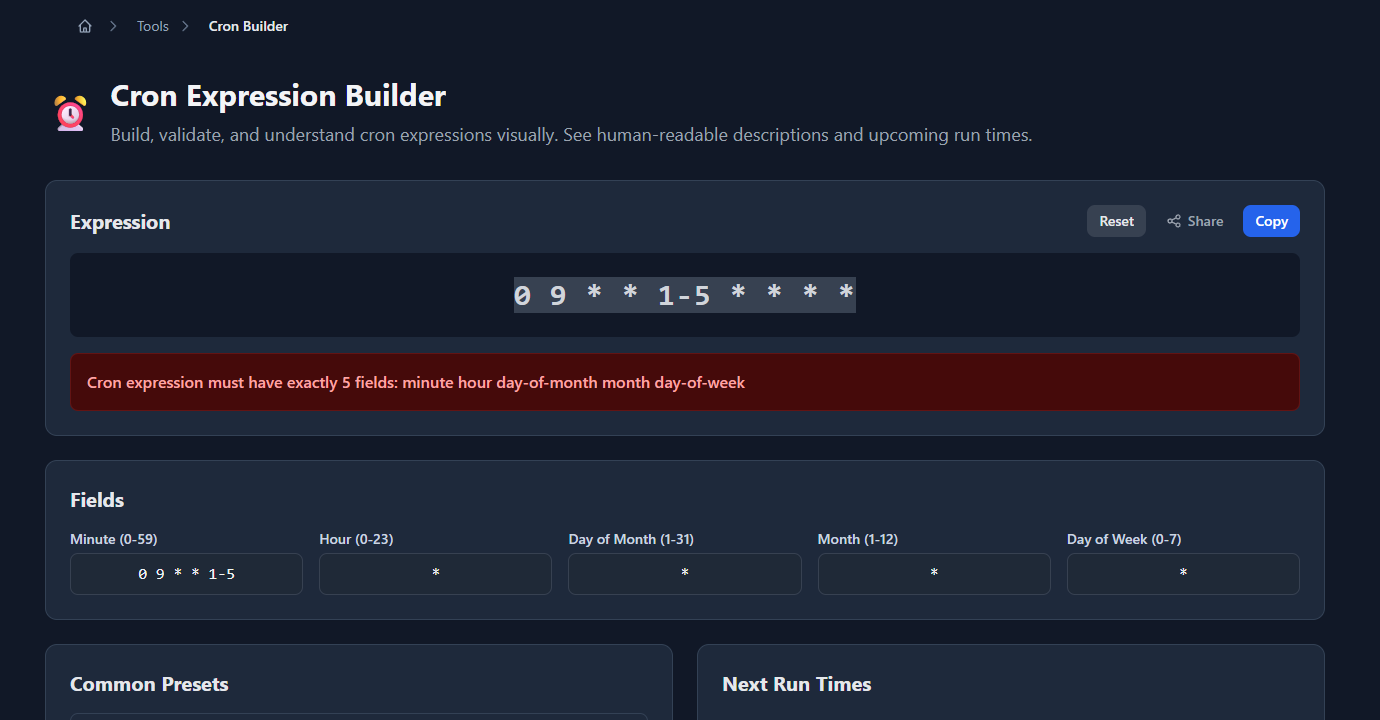
A cron expression like 0 0 8-18/2 * 1-5 is hard to parse mentally. GoGood.dev Cron Builder lets you paste any expression and immediately see what it means in plain English, plus the next 5 scheduled run times:
You can also build expressions using the visual fields (minute, hour, day, month, weekday) and see the generated cron string update in real time:
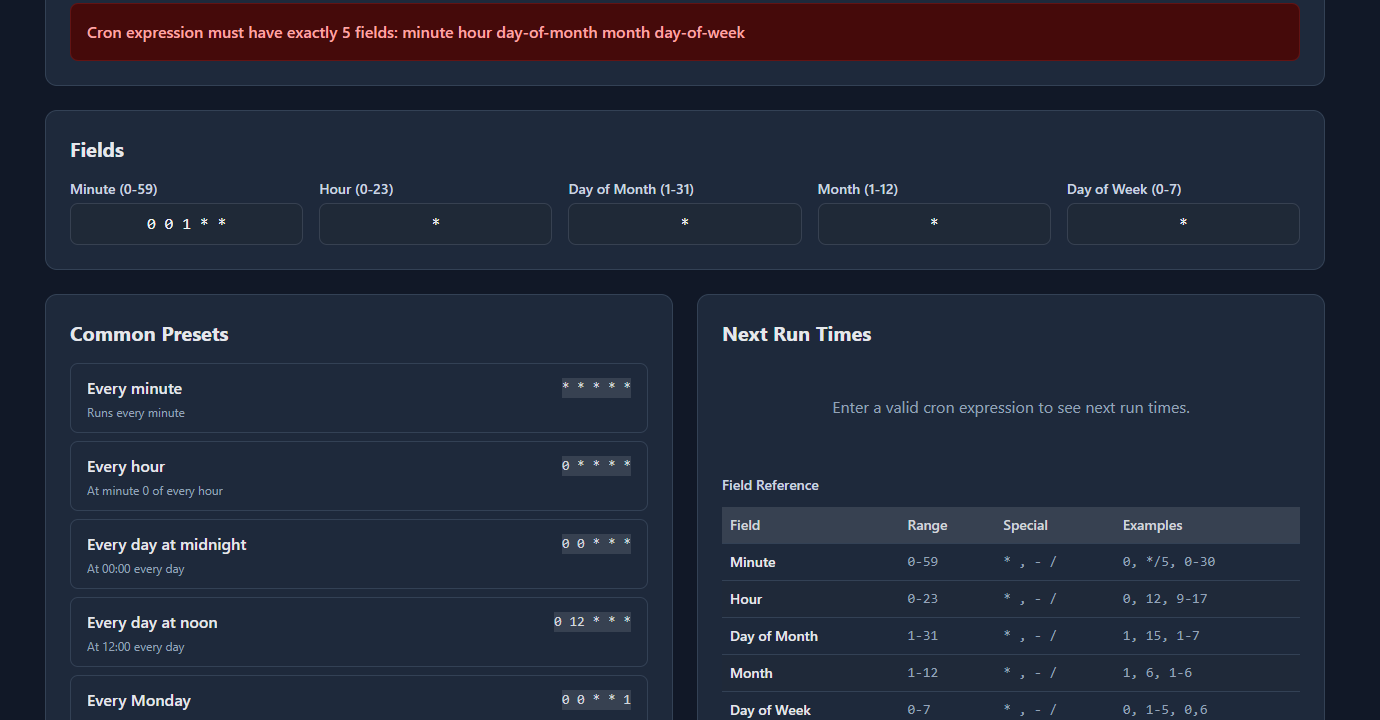
This is useful for validating expressions before deploying — especially the edge cases where day-of-month and day-of-week interact unexpectedly.
Extended cron formats
Standard cron has 5 fields. Some platforms add a 6th (seconds) or 7th (year), or add special characters like L (last), W (nearest weekday), and # (nth weekday).
GitHub Actions cron (schedule)
GitHub Actions uses standard 5-field cron, but only with UTC timezone — there’s no timezone configuration:
on:
  schedule:
    - cron: '0 9 * * 1-5'    # 9 AM UTC, weekdays
    - cron: '0 0 1 * *'       # midnight UTC, first of month
Note: GitHub Actions cron has a known delay of up to 15–20 minutes under heavy load. Don’t rely on exact timing.
AWS EventBridge (CloudWatch Events)
EventBridge uses a 6-field format: minute hour day-of-month month day-of-week year. It uses ? instead of * for the field you don’t specify when both day-of-month and day-of-week are set:
# EventBridge format
cron(0 9 * * ? *)        # 9 AM UTC every day (? in day-of-week)
cron(0 9 ? * MON-FRI *)  # 9 AM UTC, Mon–Fri (? in day-of-month)
cron(0 0 1 * ? *)        # midnight UTC, first of every month
The ? is required in one of the two day fields — EventBridge rejects expressions where both specify a value.
Kubernetes CronJob
Kubernetes uses standard 5-field cron, and supports timezone in newer versions (1.25+):
spec:
  schedule: "0 9 * * 1-5"
  timeZone: "America/New_York"    # requires Kubernetes 1.25+
Without timeZone, the schedule runs in UTC — a common source of confusion when jobs run at the “wrong” time.
Quartz Scheduler (Java)
Quartz uses a 6-field format with seconds first: second minute hour day-of-month month day-of-week. It also adds L, W, and # operators:
0 0 9 ? * MON-FRI    # 9 AM, Mon–Fri (Quartz format)
0 0 0 L * ?          # last day of every month at midnight
0 0 9 ? * 2#1        # first Monday of every month at 9 AM
Common cron expression mistakes
Day-of-week numbering varies by system
In standard cron, Sunday is 0. In some systems (including some Linux distros), Sunday is also 7. In Quartz, Sunday is 1. To avoid ambiguity, use day names (MON, TUE, SUN) when your cron implementation supports them.
Day-of-month and day-of-week combine with OR, not AND
0 9 1 * 1 # runs on the 1st of every month AND every MondayThis does NOT mean “the first Monday of every month”. It means “9 AM on the 1st of the month, or 9 AM on any Monday”. The two fields are ORed together in standard cron.
If you want “first Monday of every month”, you need to handle it in the job itself (check the date), or use a platform that supports # notation (Quartz: MON#1).
Timezone is almost always UTC
Cron daemons run in the system timezone, which is usually UTC on servers. 0 9 * * * means 9 AM in the server’s timezone — which may not be the timezone you’re thinking of. Always verify which timezone your scheduler uses and document it explicitly.
*/1 is the same as *
*/1 * * * * means “every 1 minute starting from 0” which is every minute — same as * * * * *. It’s valid but redundant.
Quick reference table
| Schedule | Expression |
|---|---|
| Every minute | * * * * * |
| Every 5 minutes | */5 * * * * |
| Every 15 minutes | */15 * * * * |
| Every 30 minutes | */30 * * * * |
| Every hour | 0 * * * * |
| Every day at midnight | 0 0 * * * |
| Every day at 9 AM | 0 9 * * * |
| Every weekday at 9 AM | 0 9 * * 1-5 |
| Every Monday | 0 9 * * 1 |
| Every Sunday at midnight | 0 0 * * 0 |
| First of every month | 0 0 1 * * |
| First of month at 9 AM | 0 9 1 * * |
| Every 6 hours | 0 */6 * * * |
| Twice a day (9 AM, 5 PM) | 0 9,17 * * * |
| Every hour on weekdays | 0 * * * 1-5 |
FAQ
What are the 5 fields in a cron expression?
Left to right: minute (0–59), hour (0–23), day of month (1–31), month (1–12), day of week (0–6, where 0 is Sunday). A * in any field means “every value”. Example: 0 9 * * 1-5 = “at minute 0, hour 9, every day-of-month, every month, Monday through Friday” = 9 AM weekdays.
How do I run a cron job every 5 minutes?
Use the step syntax: */5 * * * *. The */5 means “every 5 minutes starting from 0” — so it runs at :00, :05, :10, :15, :20, :25, :30, :35, :40, :45, :50, :55 of every hour.
How do I run a cron job on the first Monday of every month?
Standard cron can’t express this directly — 0 9 1-7 * 1 would run on any Monday AND on days 1–7, not just the first Monday. Use a platform with # notation (Quartz: 0 9 ? * MON#1) or check the date inside your job: if [ $(date +%u) -eq 1 ] && [ $(date +%d) -le 7 ]; then ....
Why is my cron job running at the wrong time?
Almost always a timezone issue. Cron runs in the system timezone, which is typically UTC on cloud servers. If you set 0 9 * * * expecting 9 AM Eastern, it runs at 9 AM UTC (4 AM or 5 AM Eastern depending on DST). Verify your server’s timezone with timedatectl or date and adjust the expression accordingly.
What’s the difference between cron on Linux and GitHub Actions cron?
Both use the standard 5-field format. The main difference: GitHub Actions cron always runs in UTC with no timezone option, and has a ~15 minute delay under load. Linux cron runs in the system timezone and fires more precisely. For precise timing, use a dedicated scheduler; for CI/CD automation, GitHub Actions cron is convenient despite the delay.
Cron syntax is small enough to memorize the structure, but the edge cases (day-of-week numbering, timezone assumptions, day-of-month AND day-of-week interaction) are worth having a reference for. Use GoGood.dev Cron Builder to validate any expression before it goes into production — seeing the next 5 run times is the fastest way to confirm the schedule is what you intended.
For related scheduling topics: Unix Timestamp to Human Date: A Developer’s Quick Reference covers timestamp conversions that come up alongside cron scheduling, and UUID v4 vs v7: Which Should You Use? covers another common developer tool decision.