How to Find Exactly What Changed in a JSON Payload
Find exactly what changed in a JSON payload — nested field paths, type changes, added and removed keys — using jq, jsondiffpatch, JSON Patch, and visual diff tools.
The API response changed. You know it changed because something downstream broke — a field came back null, a total was wrong, a nested value disappeared. But the payload is 80 lines of JSON, and the change is somewhere inside a nested object three levels deep.
Finding exactly what changed in a JSON payload isn’t just a matter of running diff on two files. A text diff treats JSON as lines of text, which means it flags whitespace, key ordering, and formatting as differences. It also fails to pinpoint the path to a changed value — it shows you the surrounding lines, not order.totals.discount changed from 0 to 11.99.
Here are the right tools for the job — command-line for quick inspection, visual for understanding scope, and programmatic for production use.
TL;DR: Paste both JSON payloads into GoGood.dev JSON Compare to see every changed field highlighted by path. For code: use
jqto extract specific paths, orjsondiffpatchto get a structured diff with exact field locations.
Why text diff fails on JSON
A standard diff treats JSON as plain text. It compares line by line and has no understanding of structure. This causes two problems:
False positives: If two JSON files have the same content but different key ordering or whitespace, diff reports hundreds of differences. None of them are real.
Missing context: If a value deep inside a nested object changes, diff shows you the surrounding lines — but not the full path to the changed field. You see "discount": 11.99 but not that it’s at order.totals.discount.
A structural diff parses the JSON, compares the data model, and reports by path — order.customer.tier: "standard" → "premium" — regardless of how either file is formatted. This is the difference between “something changed on line 47” and “here’s exactly what changed and where.”
Finding changes with jq
jq is the fastest command-line approach for targeted inspection. If you know roughly where the change is, use jq to extract just that section before diffing:
# Compare a nested section across two payloads
diff \
  <(jq --sort-keys '.order.totals' before.json) \
  <(jq --sort-keys '.order.totals' after.json)
This zeroes in on the order.totals object without the noise of the rest of the payload.
Extract all paths and their values:
# List all leaf paths with their values
jq '[path(..)] | map(join("."))' payload.json
This outputs every key path in the JSON — order.id, order.customer.tier, order.items.0.sku — which you can then compare between two payloads.
Full structural diff with jq:
diff \
  <(jq --sort-keys . before.json) \
  <(jq --sort-keys . after.json)
--sort-keys normalises key order so only real semantic changes appear in the output. This is more reliable than a raw diff but still shows line-based output rather than path-based.
Visual comparison for nested payloads
For a clear view of nested changes — especially when you want to understand the full scope of what changed across a complex payload — paste both into GoGood.dev JSON Compare:
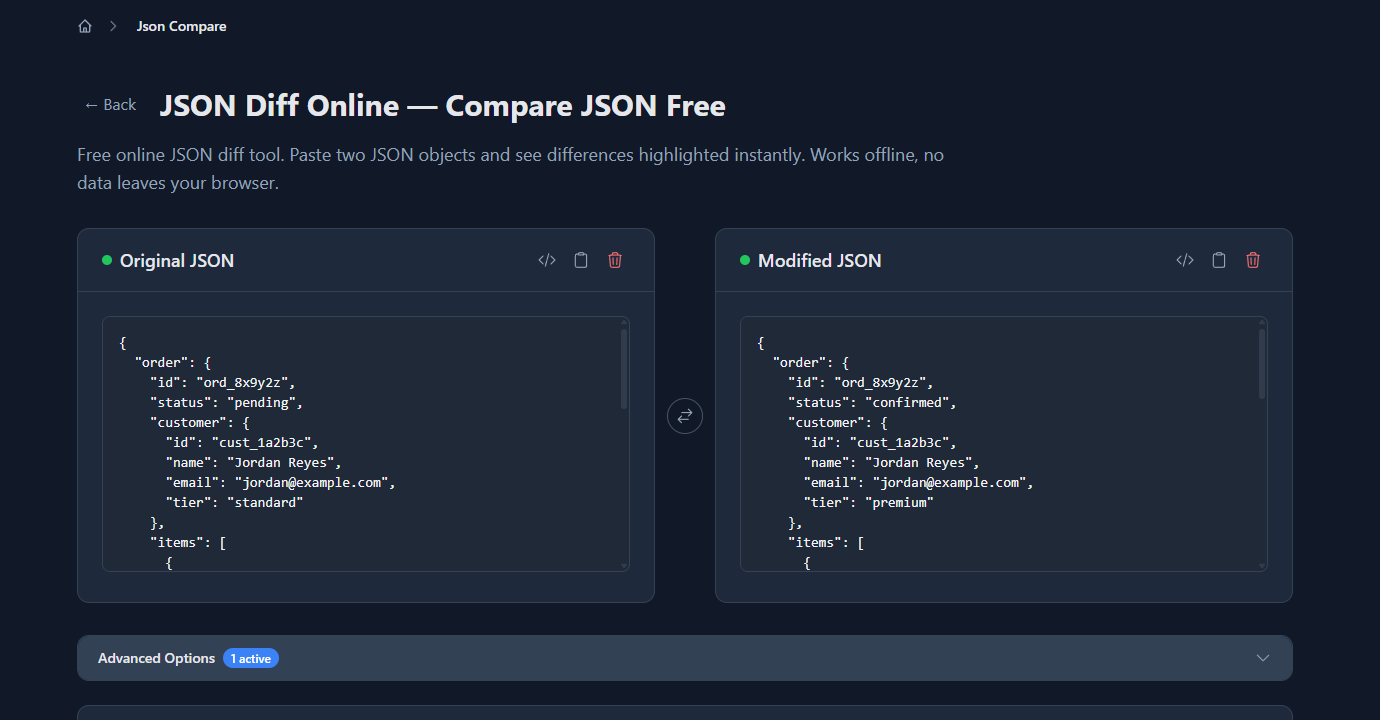
The tool diffs the full structure and highlights every change at the exact field level. In the example above — an order payload before and after an update — it finds changes across five different paths:
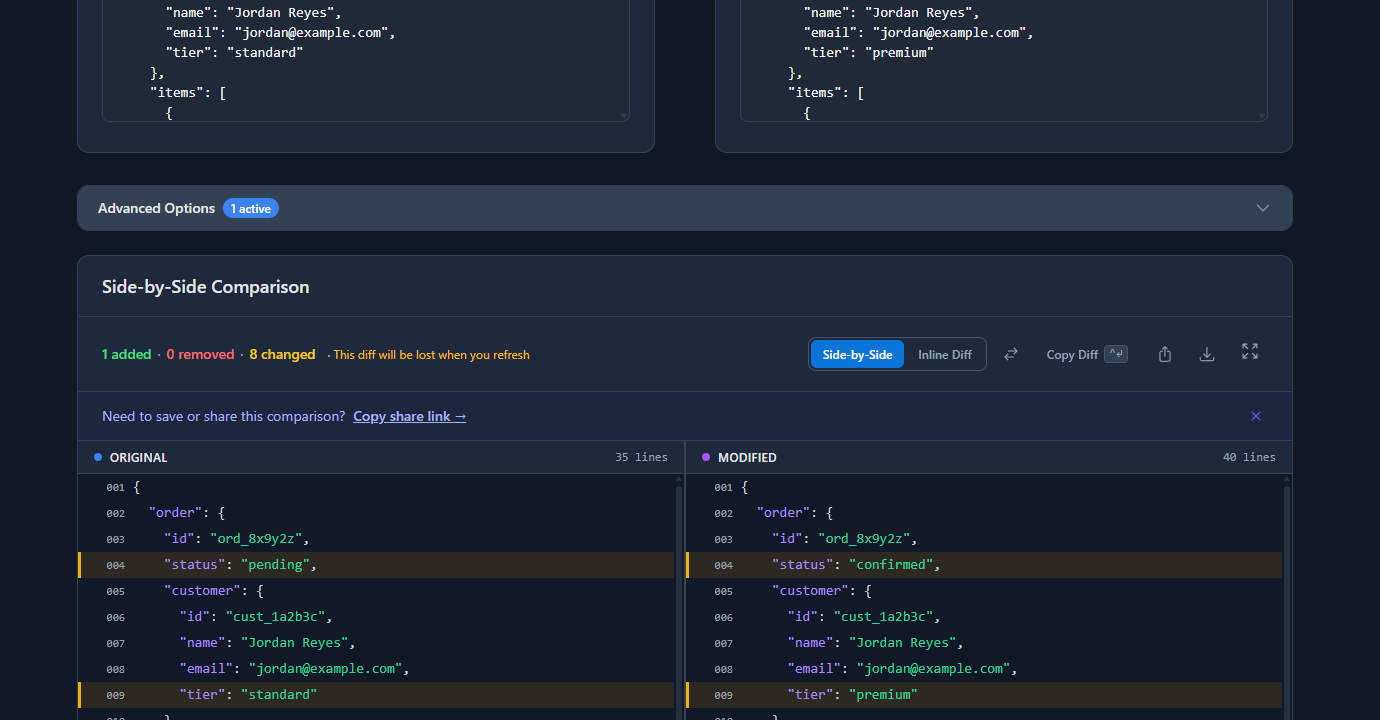
Each changed row shows the path implicitly through the tree structure: order.status changed from pending to confirmed, order.customer.tier from standard to premium, order.totals.discount from 0 to 11.99. A new item was added to the items array. This view makes it immediately clear whether a change was localised (one field) or widespread (many fields across the payload).
Programmatic diffing with jsondiffpatch
For production use — logging what changed, building audit trails, or testing payload shape in CI — you need a diff library rather than a command-line tool.
jsondiffpatch (JavaScript/Node.js):
npm install jsondiffpatchconst jsondiffpatch = require('jsondiffpatch');
const before = {
order: {
status: 'pending',
customer: { tier: 'standard' },
totals: { subtotal: 89.97, discount: 0, total: 97.17 }
}
};
const after = {
order: {
status: 'confirmed',
customer: { tier: 'premium' },
totals: { subtotal: 119.94, discount: 11.99, total: 116.59 }
}
};
const delta = jsondiffpatch.diff(before, after);
console.log(JSON.stringify(delta, null, 2));The delta output uses a compact format: [oldValue, newValue] for changed fields, [value, 0, 0] for added, [value, 0, 0] for removed. It’s machine-readable and nestable.
Flatten the delta to get change paths:
const jsondiffpatch = require('jsondiffpatch');

function flattenDelta(delta, prefix = '') {
  const changes = [];
  for (const [key, value] of Object.entries(delta)) {
    const path = prefix ? `${prefix}.${key}` : key;
    if (Array.isArray(value)) {
      if (value.length === 2) {
        changes.push({ path, from: value[0], to: value[1] });
      } else if (value.length === 1) {
        changes.push({ path, added: value[0] });
      } else if (value.length === 3 && value[2] === 0) {
        changes.push({ path, removed: value[0] });
      }
    } else if (typeof value === 'object') {
      changes.push(...flattenDelta(value, path));
    }
  }
  return changes;
}

const delta = jsondiffpatch.diff(before, after);
console.log(flattenDelta(delta));
// [
//   { path: 'order.status', from: 'pending', to: 'confirmed' },
//   { path: 'order.customer.tier', from: 'standard', to: 'premium' },
//   { path: 'order.totals.subtotal', from: 89.97, to: 119.94 },
//   ...
// ]
This gives you a flat list of changed paths — useful for logging, alerts, or building a changelog.
Python — deepdiff:
pip install deepdifffrom deepdiff import DeepDiff
before = {"order": {"status": "pending", "totals": {"discount": 0}}}
after = {"order": {"status": "confirmed", "totals": {"discount": 11.99}}}
diff = DeepDiff(before, after)
print(diff)
# {'values_changed': {
# "root['order']['status']": {'new_value': 'confirmed', 'old_value': 'pending'},
# "root['order']['totals']['discount']": {'new_value': 11.99, 'old_value': 0}
# }}deepdiff uses a path syntax like root['order']['status'] to identify each changed field. It also separately reports type changes, added items, and removed items.
JSON Patch — a standard format for describing changes
JSON Patch (RFC 6902) is a standard way to represent changes as a list of operations, each with a path:
[
  { "op": "replace", "path": "/order/status", "value": "confirmed" },
  { "op": "replace", "path": "/order/customer/tier", "value": "premium" },
  { "op": "add",     "path": "/order/items/2",        "value": { "sku": "WIDGET-C", "qty": 3, "price": 9.99 } },
  { "op": "replace", "path": "/order/totals/discount", "value": 11.99 }
]
JSON Patch paths use / as a separator and can address any depth of nesting. Libraries like jsondiffpatch can generate RFC 6902-compatible output, and tools like fast-json-patch (JavaScript) can apply patches programmatically.
Common problems finding JSON changes
The diff shows everything changed, but the payloads look identical
Usually a type change: "discount": 0 (number) vs "discount": "0" (string). A structural diff catches this because types are compared, not just string representation. A text diff won’t flag it at all if the values look the same.
Nested arrays make the diff unreadable
Arrays are harder to diff than objects because array items don’t have names — they have indices. If an item was inserted at position 0, every subsequent item shifts, and a naive diff reports all of them as changed. Tools like jsondiffpatch handle this with a longest-common-subsequence algorithm to detect moves vs changes. For simpler cases, sort the arrays before comparing (if order doesn’t matter semantically).
The payload is too large to inspect manually
Use jq to filter down to the section you care about before running the diff. If the change is in order data, extract jq '.order' first. If you’re hunting for a specific field, use jq '.. | .discount? // empty' to search all paths that contain a discount field.
You need to track changes over time, not just before/after
Store the full payload at each state as timestamped snapshots, then diff adjacent snapshots. This gives you a changelog of exactly what changed and when — useful for audit logs, debugging intermittent regressions, or customer support investigations.
FAQ
How do I find what changed in a JSON payload?
Paste both into gogood.dev/json-compare for an instant visual diff — every changed field highlighted by path. For code: jsondiffpatch in JavaScript or deepdiff in Python return a structured delta with exact paths and before/after values. Pick whichever fits the context — visual for debugging, programmatic for production audit trails.
How do I diff nested JSON fields specifically?
Extract the section first with jq: diff <(jq '.order.totals' before.json) <(jq '.order.totals' after.json). This focuses the diff on one subtree and eliminates noise from the rest of the payload. If you don’t know which section contains the change, use the full visual diff first to locate it, then drill down with jq.
Why does my JSON diff show too many changes?
Key ordering is the most common cause — different systems serialize JSON keys in different orders. jq --sort-keys normalizes both files before diffing. Second cause: whitespace differences between pretty-printed and minified JSON confuse text-based diffs. Always diff parsed JSON, not raw strings. A structural diff tool handles both automatically.
What is JSON Patch and when should I use it?
JSON Patch (RFC 6902) represents changes as a list of operations — add, remove, replace, move — each with a path like /order/status. Use it when you need to send only the delta between systems (instead of the full payload), store diffs in a database, or apply changes incrementally. It’s especially useful for collaborative editing or event sourcing where you want a log of every change.
How do I diff JSON arrays when item order might vary?
If order is semantically irrelevant, sort before diffing: jq '.items |= sort_by(.sku)' payload.json. This eliminates false positives from reordering. If order matters but items moved, jsondiffpatch uses a longest-common-subsequence algorithm to distinguish “item moved” from “item changed” — which matters a lot when diffing paginated results or sorted lists.
The tool varies by context — jq for a quick terminal check, a visual diff for understanding the full scope of a change, a library for audit trails and CI. What doesn’t change: always work with parsed structure, not raw text. Raw text diffs of JSON generate noise; structural diffs generate answers.
For more: How to Compare Two JSON Files Online covers the general comparison approach, and Why Your JSON Diff Tool Gives False Positives explains how to cut noise from ordering and formatting differences.