Regex Patterns Every Backend Developer Should Know
Regex patterns for backend developers — email, URL, IP address, UUID, dates, slugs, phone numbers. With real JavaScript and Python examples and common mistakes to avoid.
Every backend developer eventually maintains a regex. It might be validating an email address in a signup form, extracting a version number from a user-agent string, or parsing a log file for error patterns. Regex is one of those tools where knowing ten solid patterns covers 80% of real use cases — and where writing from scratch instead of using a tested pattern causes subtle bugs that only surface in production.
This post covers the regex patterns that come up most often in backend development, the flags and syntax that trip people up, and the mistakes that cause patterns to accept inputs they shouldn’t.
TL;DR: Test and debug any regex pattern at GoGood.dev Regex Tester — real-time highlighting, match details, and a pattern library. For validation code, use library functions over hand-rolled regex wherever possible.
Regex fundamentals for backend work
Before the patterns, the syntax you’ll use constantly:
| Syntax | Meaning | Example |
|---|---|---|
\d | digit (0–9) | \d{4} — 4 digits |
\w | word char (a-z, A-Z, 0-9, _) | \w+ — one or more |
\s | whitespace | \s* — zero or more |
[abc] | character class | [a-z] — any lowercase |
[^abc] | negated class | [^0-9] — not a digit |
^ | start of string | ^https — starts with https |
$ | end of string | \.json$ — ends with .json |
? | optional (0 or 1) | https? — http or https |
+ | one or more | \d+ — one or more digits |
* | zero or more | \d* — zero or more digits |
{n,m} | between n and m times | \d{2,4} — 2 to 4 digits |
() | capture group | (\d{4})-(\d{2}) |
(?:) | non-capturing group | (?:https?) |
\b | word boundary | \bword\b — exact word |
Flags:
g— global (find all matches, not just first)i— case-insensitivem— multiline (^/$match line start/end)s— dotAll (.matches newlines)
Testing regex patterns
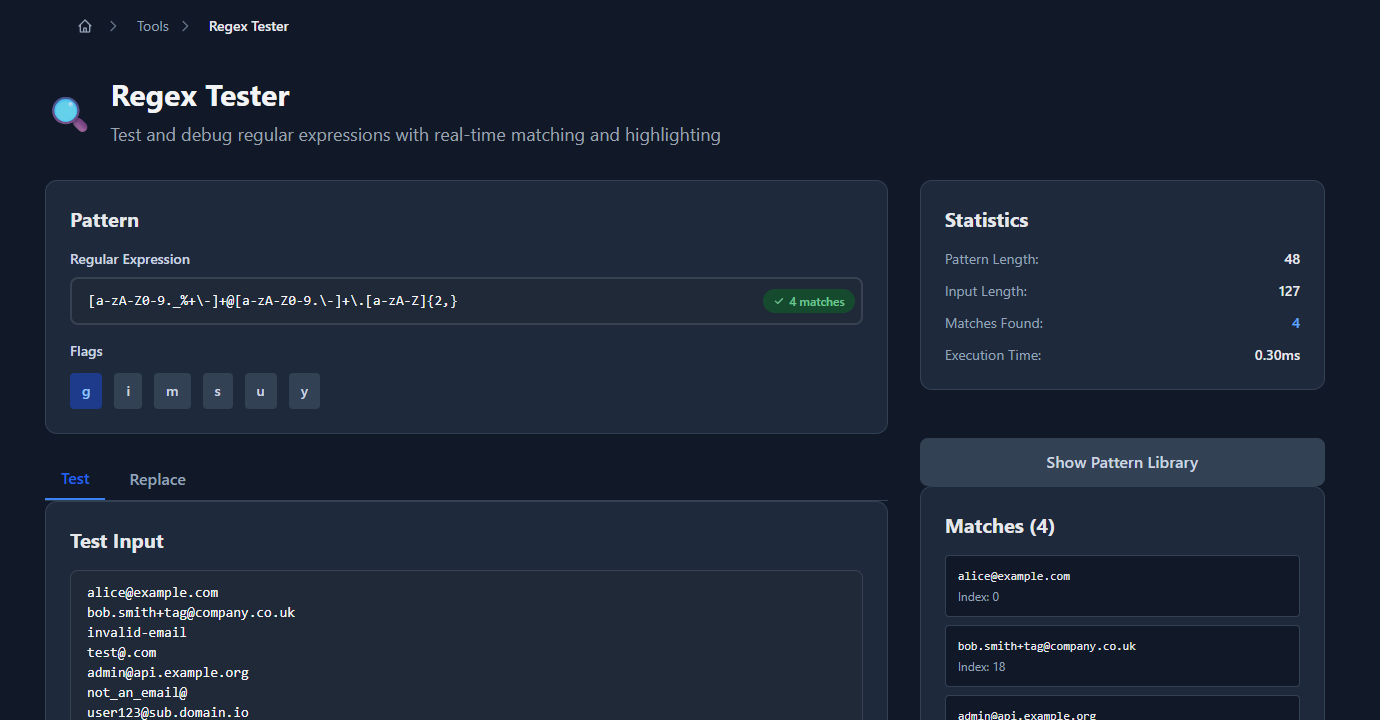
Before embedding a pattern in code, test it against representative inputs — valid ones that should match and invalid ones that shouldn’t. GoGood.dev Regex Tester highlights matches in real time:
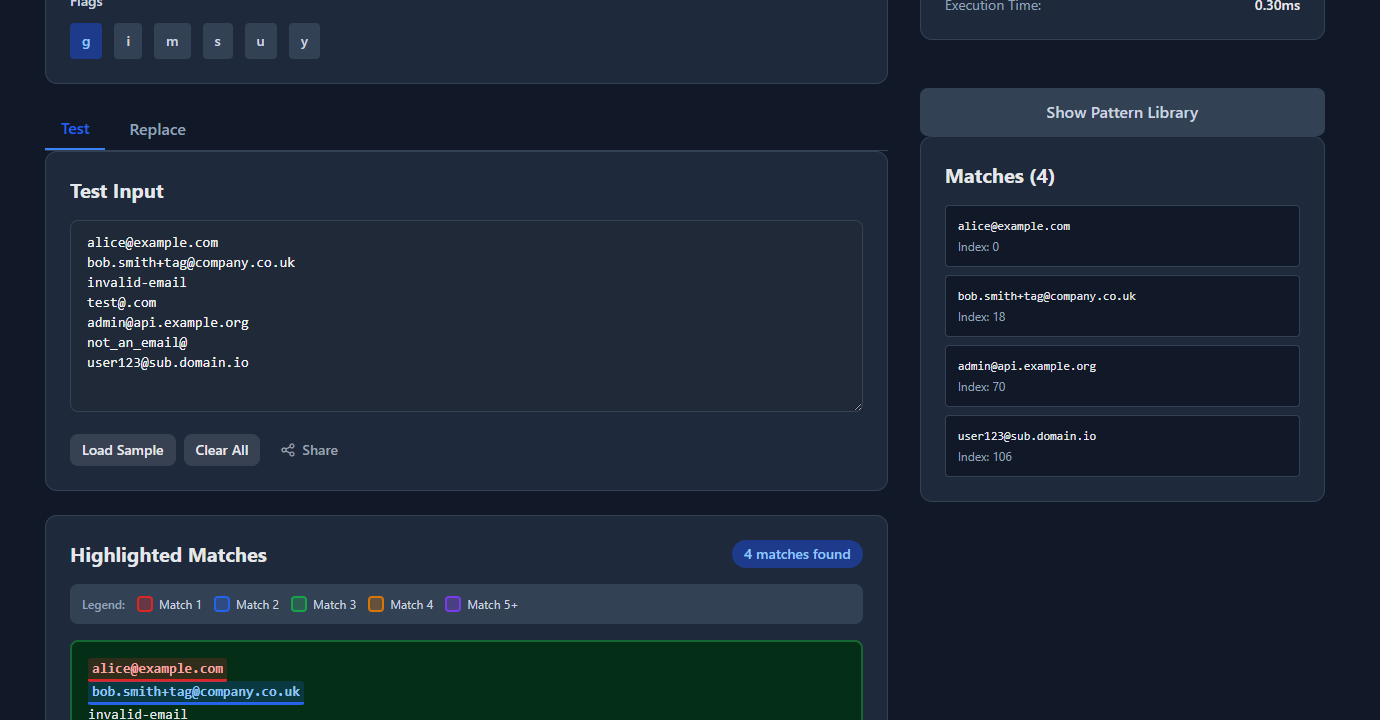
Match details and execution time are shown below the test input:
Test edge cases: empty string, all-caps input, Unicode characters, very long strings, and the specific invalid inputs you’re trying to reject.
Common backend regex patterns
Email address
// Basic — rejects obvious non-emails, not RFC 5321 compliant
const emailRegex = /^[a-zA-Z0-9._%+\-]+@[a-zA-Z0-9.\-]+\.[a-zA-Z]{2,}$/;

emailRegex.test('alice@example.com')        // true
emailRegex.test('bob+tag@company.co.uk')    // true
emailRegex.test('invalid-email')            // false
emailRegex.test('test@.com')               // false
emailRegex.test('@example.com') // falseImportant: email validation via regex is inherently imperfect. RFC 5321 allows many unusual formats that would require a 6,000-character regex to handle correctly. The right approach is: validate the basic format with regex, then confirm the address actually exists by sending a verification email. Don’t block user+tag@example.com — that’s valid.
URL
// Validates http/https URLs with optional path/query/fragment
const urlRegex = /^https?:\/\/[^\s/$.?#].[^\s]*$/i;

urlRegex.test('https://example.com')               // true
urlRegex.test('http://sub.domain.co.uk/path?q=1') // true
urlRegex.test('ftp://example.com')                 // false
urlRegex.test('not a url')                         // false
For robust URL validation in Node.js, prefer the built-in URL constructor over regex:
function isValidUrl(string) {
  try {
    const url = new URL(string);
    return url.protocol === 'http:' || url.protocol === 'https:';
  } catch {
    return false;
  }
}
IPv4 address
const ipv4Regex = /^(?:(?:25[0-5]|2[0-4]\d|[01]?\d\d?)\.){3}(?:25[0-5]|2[0-4]\d|[01]?\d\d?)$/;

ipv4Regex.test('192.168.1.1')    // true
ipv4Regex.test('255.255.255.0')  // true
ipv4Regex.test('256.0.0.1')      // false — 256 out of range
ipv4Regex.test('192.168.1')      // false — only 3 octets
IPv6 address
IPv6 is complex enough that a regex approach is fragile. Use a library:
import { isIP } from 'net';  // Node.js built-in

isIP('::1')                           // 6 (IPv6)
isIP('192.168.1.1')                   // 4 (IPv4)
isIP('2001:db8::8a2e:370:7334')       // 6 (IPv6)
isIP('not-an-ip')                     // 0 (invalid)
UUID (v4)
const uuidv4Regex = /^[0-9a-f]{8}-[0-9a-f]{4}-4[0-9a-f]{3}-[89ab][0-9a-f]{3}-[0-9a-f]{12}$/i;

uuidv4Regex.test('f47ac10b-58cc-4372-a567-0e02b2c3d479')  // true
uuidv4Regex.test('f47ac10b-58cc-5372-a567-0e02b2c3d479')  // false — version not 4
uuidv4Regex.test('not-a-uuid')                             // false

// Any UUID version (v1–v8)
const uuidRegex = /^[0-9a-f]{8}-[0-9a-f]{4}-[1-8][0-9a-f]{3}-[89ab][0-9a-f]{3}-[0-9a-f]{12}$/i;
Semantic version
const semverRegex = /^(0|[1-9]\d*)\.(0|[1-9]\d*)\.(0|[1-9]\d*)(?:-((?:0|[1-9]\d*|\d*[a-zA-Z-][0-9a-zA-Z-]*)(?:\.(?:0|[1-9]\d*|\d*[a-zA-Z-][0-9a-zA-Z-]*))*))?(?:\+([0-9a-zA-Z-]+(?:\.[0-9a-zA-Z-]+)*))?$/;

semverRegex.test('1.0.0')              // true
semverRegex.test('2.3.4-beta.1')       // true
semverRegex.test('1.0.0+build.1')      // true
semverRegex.test('1.0')                // false — missing patch
semverRegex.test('v1.0.0')             // false — v prefix not in semver spec
URL slug
// Lowercase letters, numbers, hyphens — no leading/trailing hyphens
const slugRegex = /^[a-z0-9]+(?:-[a-z0-9]+)*$/;

slugRegex.test('my-blog-post')         // true
slugRegex.test('post-2024-01-15')      // true
slugRegex.test('-invalid-slug')        // false — leading hyphen
slugRegex.test('invalid--double')      // false — consecutive hyphens

// Generate a slug from a title
function slugify(title) {
  return title
    .toLowerCase()
    .replace(/[^a-z0-9\s-]/g, '')
    .trim()
    .replace(/\s+/g, '-')
    .replace(/-+/g, '-');
}
ISO 8601 date
// YYYY-MM-DD format
const dateRegex = /^\d{4}-(0[1-9]|1[0-2])-(0[1-9]|[12]\d|3[01])$/;

dateRegex.test('2024-01-15')    // true
dateRegex.test('2024-13-01')    // false — month 13
dateRegex.test('2024-1-5')      // false — no zero-padding
dateRegex.test('15-01-2024')    // false — wrong order

// ISO 8601 datetime with timezone
const datetimeRegex = /^\d{4}-\d{2}-\d{2}T\d{2}:\d{2}:\d{2}(?:\.\d+)?(?:Z|[+-]\d{2}:\d{2})$/;

datetimeRegex.test('2024-01-15T09:23:41Z')           // true
datetimeRegex.test('2024-01-15T09:23:41.000+05:30')  // true
datetimeRegex.test('2024-01-15 09:23:41')             // false — space not T
Extracting patterns from text
// Extract all URLs from a string
const urlPattern = /https?:\/\/[^\s<>"{}|\\^`\[\]]+/gi;
const text = 'Visit https://example.com or http://docs.example.com/guide for more info.';
const urls = text.match(urlPattern);
// ['https://example.com', 'http://docs.example.com/guide']

// Extract version numbers from text
const versionPattern = /\bv?(\d+\.\d+(?:\.\d+)?)\b/g;
const releaseNotes = 'Updated from v2.1.0 to 2.3.4, requires Node 18.0';
const versions = [...releaseNotes.matchAll(versionPattern)].map(m => m[1]);
// ['2.1.0', '2.3.4', '18.0']

// Extract all email addresses from text
const emailPattern = /[a-zA-Z0-9._%+\-]+@[a-zA-Z0-9.\-]+\.[a-zA-Z]{2,}/g;
const content = 'Contact alice@example.com or bob@company.co.uk for support';
const emails = content.match(emailPattern);
// ['alice@example.com', 'bob@company.co.uk']
Log parsing
// Parse Apache/Nginx combined log format
const logPattern = /^(\S+)\s+\S+\s+(\S+)\s+\[([^\]]+)\]\s+"(\S+)\s+(\S+)\s+\S+"\s+(\d{3})\s+(\d+|-)/;

const logLine = '192.168.1.1 - alice [15/Jan/2024:09:23:41 +0000] "GET /api/users HTTP/1.1" 200 1234';
const match = logLine.match(logPattern);
// match[1] = '192.168.1.1' (IP)
// match[2] = 'alice' (user)
// match[4] = 'GET' (method)
// match[5] = '/api/users' (path)
// match[6] = '200' (status)
// match[7] = '1234' (bytes)
Common regex mistakes in backend code
Catastrophic backtracking (ReDoS)
Patterns like (a+)+ or (\w+\s*)+ can take exponential time on carefully crafted input — a denial-of-service vector called ReDoS. Any regex applied to user-supplied input must be tested against adversarial strings.
// ❌ Vulnerable to ReDoS
const dangerous = /^(\w+\s*)+$/;
dangerous.test('aaaaaaaaaaaaaaaaaaaaaaaaaX');  // may hang

// ✅ Rewrite to avoid nested quantifiers
const safe = /^\w+(\s+\w+)*$/;
Missing anchors
Without ^ and $, a pattern matches anywhere in the string:
const emailRegex = /[a-zA-Z0-9._%+\-]+@[a-zA-Z0-9.\-]+\.[a-zA-Z]{2,}/;

// ❌ Matches "not an email" because it finds the valid part
emailRegex.test('definitely not an email alice@example.com garbage');  // true!

// ✅ Anchored — requires the entire string to match
const anchored = /^[a-zA-Z0-9._%+\-]+@[a-zA-Z0-9.\-]+\.[a-zA-Z]{2,}$/;
anchored.test('definitely not an email alice@example.com garbage');  // false
Using regex for things that have better tools
- URL parsing: use
new URL()(browser/Node) orurllib.parse(Python) - HTML parsing: use a DOM parser, never regex
- JSON extraction: use
JSON.parse() - Date parsing: use a date library like
date-fnsor Python’sdatetime - CSV parsing: use a CSV library
Regex for HTML is a classic mistake — HTML is not a regular language and nested structures will break any regex.
Forgetting the global flag causes lastIndex to persist
In JavaScript, stateful regex objects with the g flag remember their lastIndex between calls:
const regex = /\d+/g;
regex.test('abc123');  // true — lastIndex moves to 6
regex.test('abc123');  // true — finds from position 6... or false if at end

// ✅ Use new regex literal each time, or reset lastIndex
const test = (str) => /\d+/g.test(str);  // fresh regex each call
FAQ
What’s the difference between .test() and .match() in JavaScript?
.test(string) returns true/false — use it for validation. .match(regex) returns an array of matches or null — use it for extraction. For all matches with the g flag, use string.matchAll(regex) which returns an iterator of match objects including capture groups.
Should I use regex for email validation?
For basic format checking, yes. For production systems, validate format with a simple regex, then confirm ownership by sending a verification email. The only reliable way to know if an email address is valid is to deliver to it. Don’t try to match the full RFC 5321 spec — it’s not worth the complexity.
How do I make a regex case-insensitive?
Add the i flag: /pattern/i in JavaScript, re.compile(pattern, re.IGNORECASE) in Python. This makes letter matching case-insensitive without changing the pattern.
What is a non-capturing group (?:)?
A non-capturing group groups characters (for alternation or quantifiers) without creating a numbered capture group. Use (?:https?) instead of (https?) when you need the grouping but don’t need match[1] to contain the protocol. It’s slightly faster and avoids polluting your match array.
How do I test if a regex is vulnerable to ReDoS?
Test with input like 'a'.repeat(30) + 'X' and measure execution time. If it takes more than a few milliseconds, the pattern likely has exponential backtracking on adversarial input. Tools like safe-regex (npm) or rxxr2 can statically detect vulnerable patterns.
A well-tested regex is a reliable tool. The patterns above cover most of what comes up in backend validation and text processing. Build a test suite for any regex you own — a collection of valid inputs that must match and invalid inputs that must not — so you catch regressions when you modify the pattern.
For related tools: How to Validate JSON Online covers structured data validation that complements regex-based input checking, and URL Encode vs URL Decode: When and Why covers the encoding step that often precedes or follows regex-based URL parsing.