Common JSON Errors and How to Debug Them
Debug common JSON errors fast — SyntaxError, unexpected token, null values, type mismatches, and structural issues — with practical fixes and the right tools.
JSON errors fall into two categories: syntax errors that prevent parsing entirely, and structural errors that parse fine but produce wrong behaviour. The first category is easy — the JSON parser tells you something is wrong and (usually) gives you a line number. The second category is harder — the code runs, the JSON parses, but a field is null when it should have a value, or a boolean came back as a string, or a nested object is missing entirely.
Here’s how to resolve each one quickly — syntax errors, structural mismatches, null fields, type bugs — and the tools that make the diagnosis fast.
TL;DR: For syntax errors, paste the JSON into GoGood.dev JSON Compare — it validates and highlights parse errors immediately. For structural errors, paste your expected shape alongside the actual response to see exactly what’s missing or wrong.
Category 1: JSON syntax errors
These prevent JSON.parse() from running at all. The error message is always a SyntaxError variant.
”Unexpected token” errors
SyntaxError: Unexpected token } in JSON at position 142
SyntaxError: Unexpected token ' in JSON at position 0
Trailing comma — the most common cause. JavaScript objects allow trailing commas; JSON does not.
// ❌ Invalid JSON — trailing comma after last property
{
  "name": "Alice",
  "role": "admin",
}

// ✅ Valid JSON
{
  "name": "Alice",
  "role": "admin"
}
Single quotes instead of double quotes — JSON requires double quotes for both keys and string values. Single quotes are invalid.
// ❌ Invalid — single quotes
{'name': 'Alice', 'role': 'admin'}

// ✅ Valid — double quotes
{"name": "Alice", "role": "admin"}
Unquoted keys — JavaScript object literal syntax allows unquoted keys; JSON does not.
// ❌ Invalid JSON (valid JS object literal)
{name: "Alice", role: "admin"}

// ✅ Valid JSON
{"name": "Alice", "role": "admin"}
Missing comma between properties:
// ❌ Missing comma after "Alice"
{
  "name": "Alice"
  "role": "admin"
}
Tip for locating the error: The position number in the error message is the character index where the parser failed — not necessarily where the actual mistake is (the parser often fails a character or two after the real problem). Count characters from the start of the string, or paste the JSON into a validator that highlights the error inline.
”Unexpected end of JSON input”
SyntaxError: Unexpected end of JSON inputThe JSON string was cut off before it was complete. Common causes:
- Response body was truncated (network error, buffer overflow, or response streaming interrupted)
- A template string accidentally produced incomplete JSON
- The file was written partially (disk full, interrupted write)
Check whether the JSON string ends with } or ] as expected. If the response came from an API, check whether Content-Length matches the actual body size.
Category 2: Structural JSON errors
These are the slow burns. The JSON parses without complaint. Your code runs. And then something is wrong — a field is null, a total is off, a UI renders "undefined". The parser didn’t catch it because it’s not a syntax problem; it’s a shape problem.
Null values where objects are expected
// JSON: { "user": { "subscription": null } }
const plan = response.user.subscription.plan;
// TypeError: Cannot read properties of null (reading 'plan')
The server returned null for a nested object instead of the expected object shape. This happens when a user has no active subscription, a related record was deleted, or the backend conditionally omits data for certain states.
Fix: Always guard against null before accessing nested properties:
const plan = response.user.subscription?.plan ?? 'free';Or validate the full response shape on receipt:
if (!response.user.subscription) {
  // Handle the no-subscription case explicitly
  return handleNoSubscription();
}
Type mismatches (boolean as string, number as string)
// JSON: { "active": "true" }
if (response.active === true) {
  // Never runs — "true" !== true
}
This is a server-side serialisation bug — the field should be a boolean but was serialised as a string. It’s particularly common after an API refactor or when data passes through a system that stringifies everything (some message queues, logging systems, or ORMs do this).
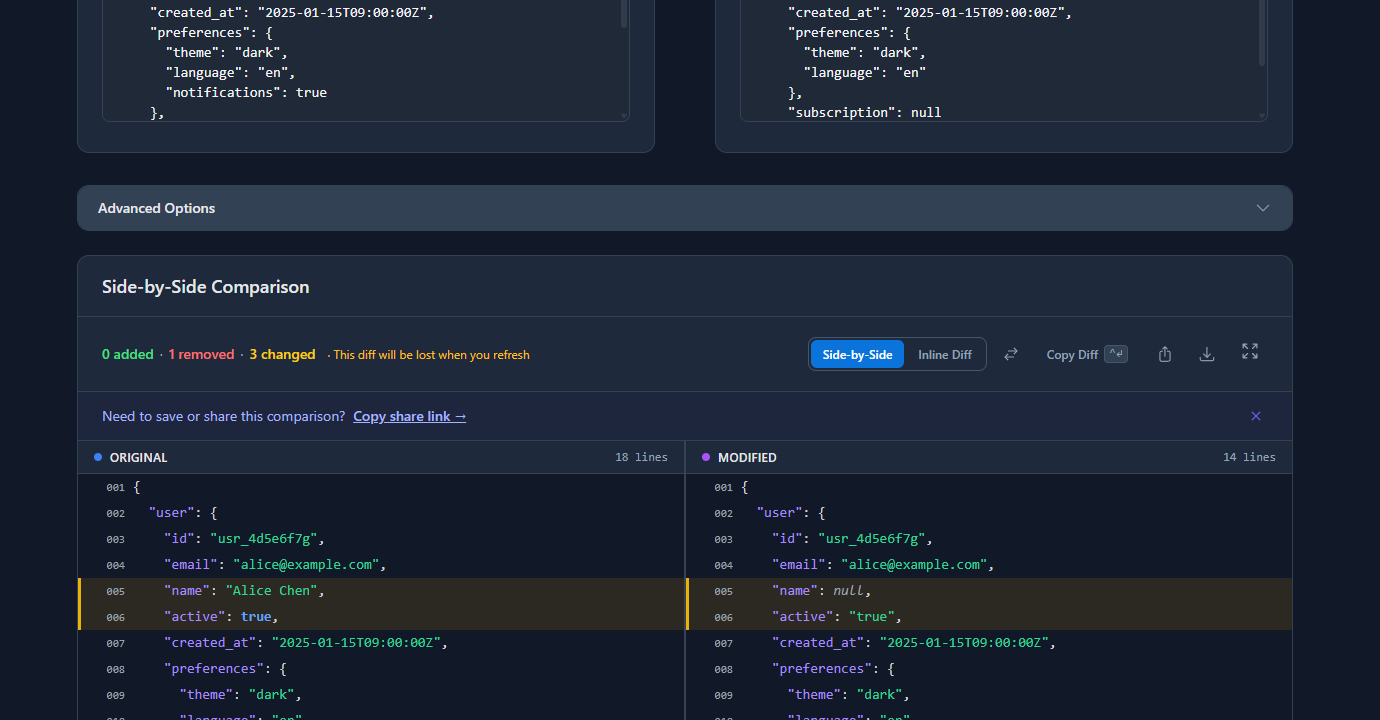
How to detect it: A structural comparison between your expected schema and the actual response will catch type mismatches — true (boolean) and "true" (string) are different values. Paste both into GoGood.dev JSON Compare to see the mismatch highlighted:
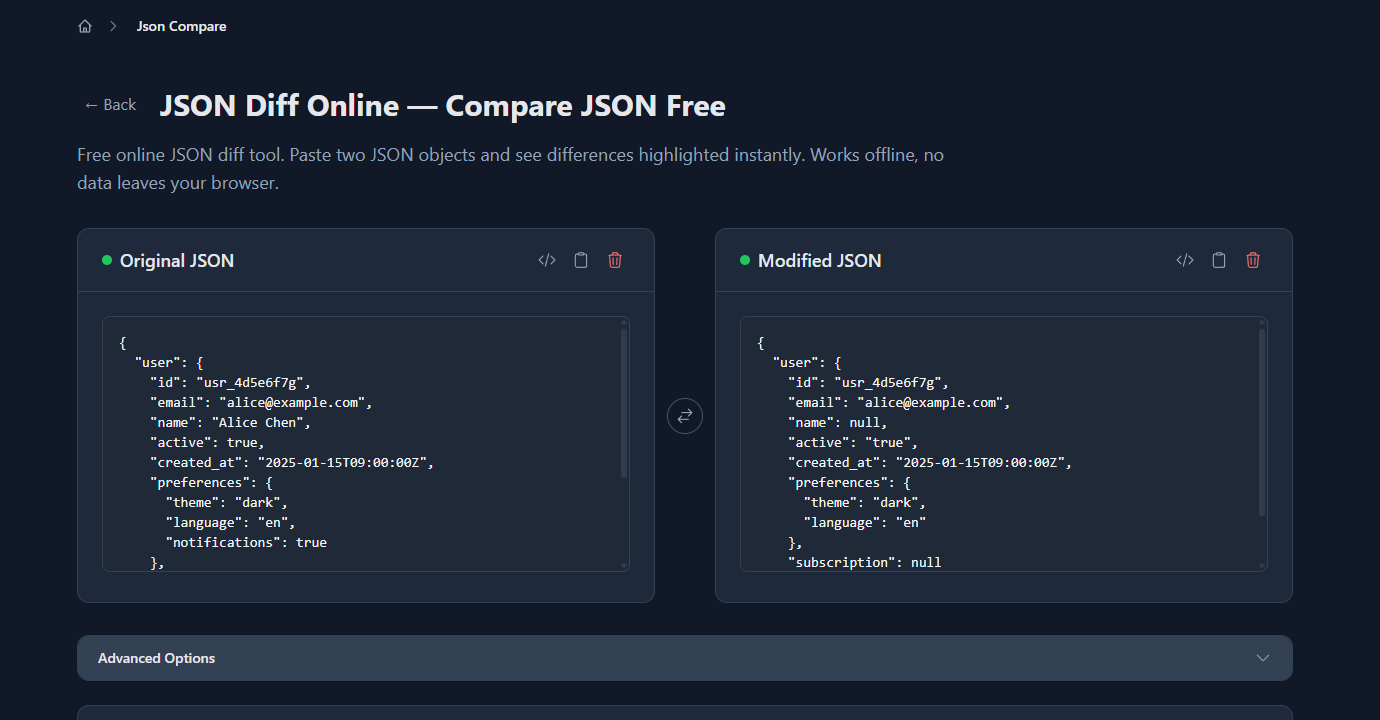
The diff shows exactly where the actual response diverges from the expected shape — active as string instead of boolean, name as null instead of a string, subscription as null instead of an object, and a missing notifications field:
Fix on the consumer side (if you can’t fix the server):
// Coerce string booleans to real booleans
const active = response.active === true || response.active === 'true';
Missing required fields
An API returns a response without a field your code depends on:
// JSON: { "user": { "id": "usr_123", "email": "alice@example.com" } }
// 'name' field is missing
const greeting = `Hello, ${response.user.name}`;
// Renders: "Hello, undefined"
The field might have been removed in a backend refactor, never populated for certain user states, or gated behind a feature flag that isn’t enabled for this user.
Fix: Use nullish coalescing for optional fields, or validate required fields explicitly:
// Fallback for optional fields
const greeting = `Hello, ${response.user.name ?? 'there'}`;

// Explicit validation for required fields
const required = ['id', 'email', 'name'];
const missing = required.filter(key => response.user[key] == null);
if (missing.length > 0) {
  throw new Error(`API response missing required fields: ${missing.join(', ')}`);
}
Encoding issues producing garbled strings
"city": "San Jos\u00e9"   // correctly encoded Unicode
"city": "San José"       // double-encoded UTF-8
"description": "30\\u20ac per month"  // escaped when it shouldn't be
Double-encoding happens when a string that’s already JSON-encoded gets encoded again. Garbled characters (é for é) indicate UTF-8 bytes were interpreted as Latin-1.
Fix:
// Detect double-encoded JSON (string starts with `"` after parsing)
const value = JSON.parse(response.data);
if (typeof value === 'string') {
  // Was double-encoded — parse again
  const actual = JSON.parse(value);
}
For character encoding issues: ensure both server and client agree on UTF-8, and check that Content-Type: application/json; charset=utf-8 is set in the response headers.
Debugging workflow
Step 1: Is it valid JSON at all?
Paste it into a validator. Fix any syntax errors before doing anything else — there’s no point debugging structure if the parser can’t read it.
Step 2: Does the structure match what you expect?
Paste the actual response alongside your expected shape (or a previous working response) into a JSON diff tool. Null fields, type mismatches, and missing keys surface immediately. This step finds 80% of structural bugs in under a minute.
Step 3: Trace where the value comes from
Null or missing field? Walk it backwards: is it null in the database? Never set in the API handler? Filtered by serialisation rules? Log at each stage. The bug is usually at the first place the value disappears.
Step 4: Add validation so you catch it earlier next time
Add explicit validation at the point where you receive external JSON. A descriptive error at the API boundary beats a silent undefined three function calls deeper.
Tools for debugging JSON errors
Browser DevTools Console — for quick syntax checking:
// Paste in the console to validate
JSON.parse(`your json string here`);
// If it throws, you have a syntax error
jq on the command line — validates and pretty-prints:
echo '{"name": "Alice", "role": "admin",}' | jq .
# parse error (Invalid numeric literal) at line 1, column 37
JSON diff tools — for structural comparison. GoGood.dev JSON Compare runs in the browser, handles large payloads, and shows structural differences field by field. Useful for comparing an expected schema against an actual response to find missing or wrong-typed fields.
TypeScript — catches structural mismatches at compile time if you define interfaces for your API responses:
interface UserResponse {
  id: string;
  email: string;
  name: string;       // string, not null
  active: boolean;    // boolean, not string
  subscription: {
    plan: string;
    expires_at: string;
  };
}

// TypeScript will error if the response doesn't match
const user: UserResponse = await fetchUser();
Combining TypeScript interfaces with a runtime validator like Zod gives you both compile-time safety and runtime protection against unexpected API responses.
FAQ
What causes “SyntaxError: Unexpected token” in JSON?
Trailing comma is the most common culprit — perfectly valid in JavaScript objects, illegal in JSON. After that: single quotes instead of double, unquoted keys, missing comma between properties. The character position in the error message is where the parser gave up, not always where the typo is. Paste the JSON into a validator — it’ll highlight the right spot.
How do I debug a JSON response that parses but gives wrong values?
Stop console.logging individual fields — paste the whole actual response alongside your expected schema into gogood.dev/json-compare. Type mismatches ("true" vs true), null fields, missing keys — all highlighted at once. It’s usually faster to diff the whole payload than to chase one field at a time.
Why does JSON.parse() throw “Unexpected end of JSON input”?
The string got cut off before it was complete. Most common causes: a network interruption that truncated the response body, a buffer limit that silently dropped the end, or a file written partially (disk full, process killed mid-write). Check whether Content-Length matches the actual body you received. If the JSON ends without a closing } or ], the data never arrived complete.
How do I handle null values in JSON without crashing?
Optional chaining and nullish coalescing: response.user?.subscription?.plan ?? 'free'. For required fields, validate on receipt and throw a clear error — throw new Error('subscription is required but was null') beats TypeError: Cannot read properties of null six stack frames later. Fail at the boundary, not in the middle of your business logic.
Why is my boolean coming back as a string “true” instead of true?
The backend is serialising it as a string — either the ORM is returning raw database values (some databases store booleans as 1/0), or the data passes through a message queue or logging system that stringifies everything. Fix it at the source. If you can’t touch the backend: const active = value === true || value === 'true', but document why — the next developer will be confused and you don’t want them “fixing” it and breaking the coercion.
Syntax errors announce themselves. Structural errors are quiet — the code runs fine and something is just slightly wrong, somewhere. The comparison step is the unlock: paste expected next to actual and the gap is usually obvious in under a minute.
For more: How to Find Exactly What Changed in a JSON Payload covers path-based diff techniques, and Why Your JSON Diff Tool Gives False Positives explains how to cut noise when comparing responses.