Reading JWT Payloads in the Browser — No Code Needed
How to decode JWT payloads in the browser without code — read claims, check expiry, inspect permissions, and understand what's inside any token instantly.
You get handed a JWT and need to know what’s in it. Maybe you’re debugging a 403 and need to check whether the role claim is what you expect. Maybe the API is rejecting the token and you want to see if exp has already passed. Maybe you just want to understand what claims your auth system is issuing.
You don’t need to write code to decode a JWT payload. The payload is Base64url-encoded JSON — anyone with the token can read it in seconds, in the browser, with no libraries or setup. This post covers how to decode JWT payloads in the browser, what each section of a token contains, and what to look for when debugging auth issues.
TL;DR: Paste your JWT into GoGood.dev JWT Decoder — it decodes the header, payload, and all claims instantly, shows expiry status, and converts Unix timestamps to readable dates. No code, no installs.
What a JWT actually contains
A JWT has three parts separated by dots: header.payload.signature.
eyJhbGciOiJIUzI1NiIsInR5cCI6IkpXVCJ9.eyJzdWIiOiJ1c3JfNGQ1ZTZmN2ciLCJyb2xlIjoiYWRtaW4ifQ.SflKxwRJSMeKKF2QT4fwpMeJf36POk6yJV_adQssw5c- Header (first segment) — algorithm and token type. Always
{"alg":"HS256","typ":"JWT"}or similar. - Payload (second segment) — the claims: who the user is, what they can do, when the token expires.
- Signature (third segment) — a cryptographic hash of the header + payload, verified by the server. You can’t decode it without the secret key, and you don’t need to for debugging.
The header and payload are Base64url-encoded, not encrypted. Anyone who has the token string can decode both. This is by design — JWTs are meant to be readable by the client, but only trusted if the server verifies the signature.
How to decode JWT payloads in the browser
Option 1: Online JWT decoder (no code)
Paste the token into GoGood.dev JWT Decoder:
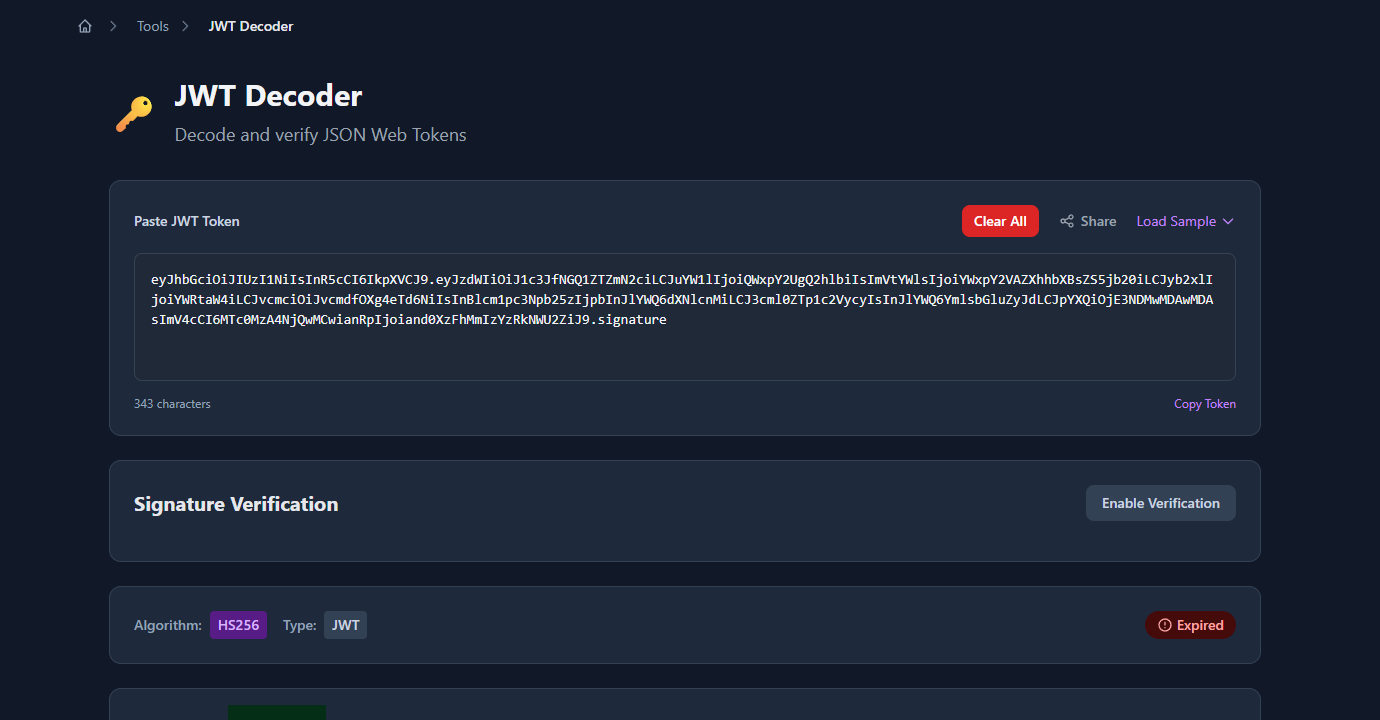
The tool decodes the header and payload immediately and presents each claim in a readable table. Unix timestamps (exp, iat, nbf) are converted to human-readable local dates with a relative time like “expires in 23 hours” or “expired 2 days ago”:
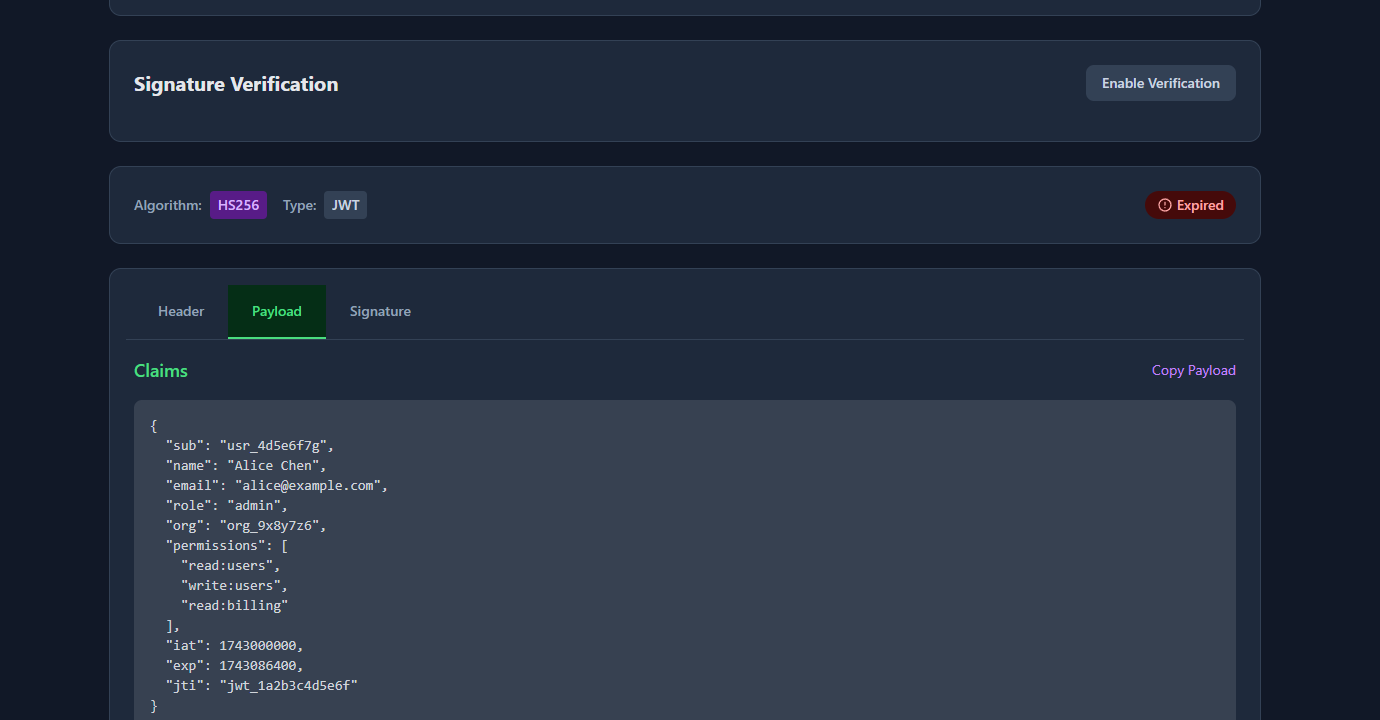
Nothing is sent to a server — the decoding happens entirely in your browser. This makes it safe to use with real tokens from your local dev or staging environment (though you should never paste production user tokens into any online tool as a general practice).
Option 2: Browser console (two lines)
If you’re already in DevTools, you can decode the payload directly in the console:
// Paste this into the browser console, replace TOKEN with your JWT
const token = 'eyJhbGci...your.token.here';
const payload = JSON.parse(atob(token.split('.')[1].replace(/-/g, '+').replace(/_/g, '/')));
console.log(payload);
The .replace(/-/g, '+').replace(/_/g, '/') converts Base64url to standard Base64 before atob() decodes it. Without this step, atob() throws an error on tokens that contain - or _ characters.
To also read the header:
const [rawHeader, rawPayload] = token.split('.');
const fix = s => s.replace(/-/g, '+').replace(/_/g, '/');
const header  = JSON.parse(atob(fix(rawHeader)));
const payload = JSON.parse(atob(fix(rawPayload)));
console.log({ header, payload });
Option 3: Bookmark a decoder snippet
If you decode tokens frequently during development, add this as a browser bookmark with a javascript: URL:
javascript:(function(){
  const t = prompt('Paste JWT:');
  if (!t) return;
  const fix = s => s.replace(/-/g,'+').replace(/_/g,'/');
  const [h, p] = t.split('.').slice(0,2).map(s => JSON.parse(atob(fix(s))));
  alert(JSON.stringify({header:h,payload:p},null,2));
})();
Click the bookmark, paste any JWT, and get the decoded JSON in an alert. Useful when you’re debugging a staging environment and don’t want to leave the page.
What to look at in the decoded payload
Once you have the payload decoded, here’s what to check for common debugging scenarios:
Debugging a 403 Forbidden:
Check role, permissions, or scope — whatever your API uses for authorisation. The token might have role: "member" when the endpoint requires role: "admin". Or the permissions array might be missing write:users.
{
  "sub": "usr_4d5e6f7g",
  "role": "member",
  "permissions": ["read:users"]
}
If the claims look wrong, the issue is upstream — either the token was issued with the wrong claims, or you’re using a token from the wrong environment.
Debugging a 401 Unauthorized:
Check exp (expiry). The claim is a Unix timestamp in seconds. If it’s in the past, the token is expired and the server will reject it regardless of other claims.
{
  "exp": 1743000000,
  "iat": 1742913600
}
An online decoder converts this to a readable date. In the console: new Date(payload.exp * 1000).toISOString().
Checking the audience (aud):
Some APIs validate that the token was issued for their specific service. If your API returns 401 and exp hasn’t passed, check whether aud matches what the server expects:
{
  "aud": "https://api.example.com",
  "iss": "https://auth.example.com"
}
If aud is https://staging.api.example.com but you’re hitting production, the server will reject it.
Reading custom claims:
JWTs can carry any JSON data in the payload. Your auth system might include organisation ID, subscription tier, feature flags, or user preferences:
{
  "org": "org_9x8y7z6",
  "plan": "pro",
  "features": ["analytics", "exports"]
}
Decoding the token shows exactly what your frontend receives and can read without an API call.
What you cannot do without the secret key
Decoding is not the same as verifying. Anyone can decode the payload — but only the server with the secret key can verify that the token is genuine and hasn’t been tampered with.
Things you can do by decoding:
- Read all claims in the payload
- Check expiry, issued-at, and not-before timestamps
- Inspect roles, permissions, and custom claims
- Understand what the auth system issued
Things you cannot do without the secret key:
- Verify the token’s signature (confirm it wasn’t forged or modified)
- Trust the claims for security decisions
- Create a valid token
For debugging purposes, you don’t need verification — you’re reading claims to understand what the token says, not to make a security decision. For production auth, always verify server-side.
Common problems when reading JWT payloads
atob() throws “InvalidCharacterError”
JWT uses Base64url, which replaces + with - and / with _. Standard atob() doesn’t handle these characters. Always apply the substitution before decoding:
const fixed = encoded.replace(/-/g, '+').replace(/_/g, '/');
const payload = JSON.parse(atob(fixed));
The payload looks like garbage
You might be trying to decode the signature (third segment) instead of the payload (second segment). Split on . and take index 1:
const payload = token.split('.')[1]; // index 1 = payloadThe signature segment is not Base64url-encoded JSON — it’s a binary hash. It won’t parse as JSON.
The token has four segments
A JWE (JSON Web Encryption) token has five dot-separated segments and an encrypted payload — it’s not readable without the private key. A standard JWT has exactly three segments. If you see more than three, you have a JWE, not a JWT.
exp timestamp looks wrong
JWT timestamps are in seconds since the Unix epoch. JavaScript’s Date constructor expects milliseconds. Always multiply by 1000:
new Date(payload.exp * 1000).toISOString(); // ✅ correct
new Date(payload.exp).toISOString();         // ❌ gives a date in 1970
FAQ
How do I decode a JWT in the browser without code?
Paste the token into gogood.dev/tools/jwt-decoder. It decodes the header and payload instantly in your browser, converts Unix timestamps to readable dates, and shows whether the token is expired. No login, no data sent to a server.
Is it safe to paste a JWT into an online decoder?
For dev and staging tokens — generally yes, since online decoders like GoGood.dev run entirely in the browser (no server uploads). For production tokens containing real user data, use the browser console approach instead: JSON.parse(atob(token.split('.')[1].replace(/-/g,'+').replace(/_/g,'/'))).
Can I verify a JWT signature in the browser?
You can verify an RS256 JWT in the browser using the Web Crypto API and the public key. But HS256 (symmetric) requires the secret key, which should never be in client-side code. For debugging purposes, reading claims without signature verification is usually enough.
Why can anyone read a JWT payload?
JWTs are designed to be transparent to the client that holds them. The signature prevents forgery — a client can read the claims but cannot change them without invalidating the signature. This is intentional: the client needs to read its own roles and expiry to make UX decisions (redirect to login, show/hide features) without an extra API call.
What’s the difference between a JWT and a JWE?
A JWT (JSON Web Token) has a readable payload encoded as Base64url. A JWE (JSON Web Encryption) has an encrypted payload — the content is only accessible to the holder of the private key. JWEs have five segments instead of three. If you can read the payload, it’s a JWT. If you can’t, it’s a JWE.
Decoding a JWT payload is a two-minute task that consistently saves thirty minutes of 401/403 debugging. The payload contains the full picture of what the token grants — read it before assuming the issue is in your code.
For the next step: How to Check If a JWT Token Is Expired covers the expiry check in code, and JWT Claims Explained with Real Examples documents all seven registered claims and when each one matters.