Common REST API Mistakes and How to Catch Them
The most common REST API mistakes developers make — field renames, type changes, missing error handling, wrong status codes — and how to catch them before production.
Most REST API bugs aren’t dramatic — the server doesn’t crash, the response doesn’t fail. The bug is quieter: a field was renamed from id to productId, a price came back as a string instead of a number, a nested key disappeared without announcement. The API still returns 200. Your frontend breaks two hours later when it tries to do arithmetic on "129.99".
These are the common REST API mistakes that cause the most debugging time — not because they’re hard to understand, but because they’re invisible without the right tools. This post covers the mistakes that show up repeatedly in production, with specific techniques to catch each one before it reaches users.
TL;DR: Most silent REST API regressions are field renames, type changes, or missing keys. Paste two API responses (before and after a deploy) into GoGood.dev JSON Compare to surface every difference immediately.
Mistake 1: Silent field renames
Field renames are one of the most common REST API mistakes — and one of the hardest to catch manually. The API changes user_id to userId (snake_case to camelCase), or in_stock to inStock. The old field disappears; a new one appears with the same value. No error is thrown. Code that accesses product.in_stock just gets undefined.
Why it happens: Backend teams refactor naming conventions (camelCase vs snake_case), add an ORM layer that uses different field names, or upgrade a library that serialises differently.
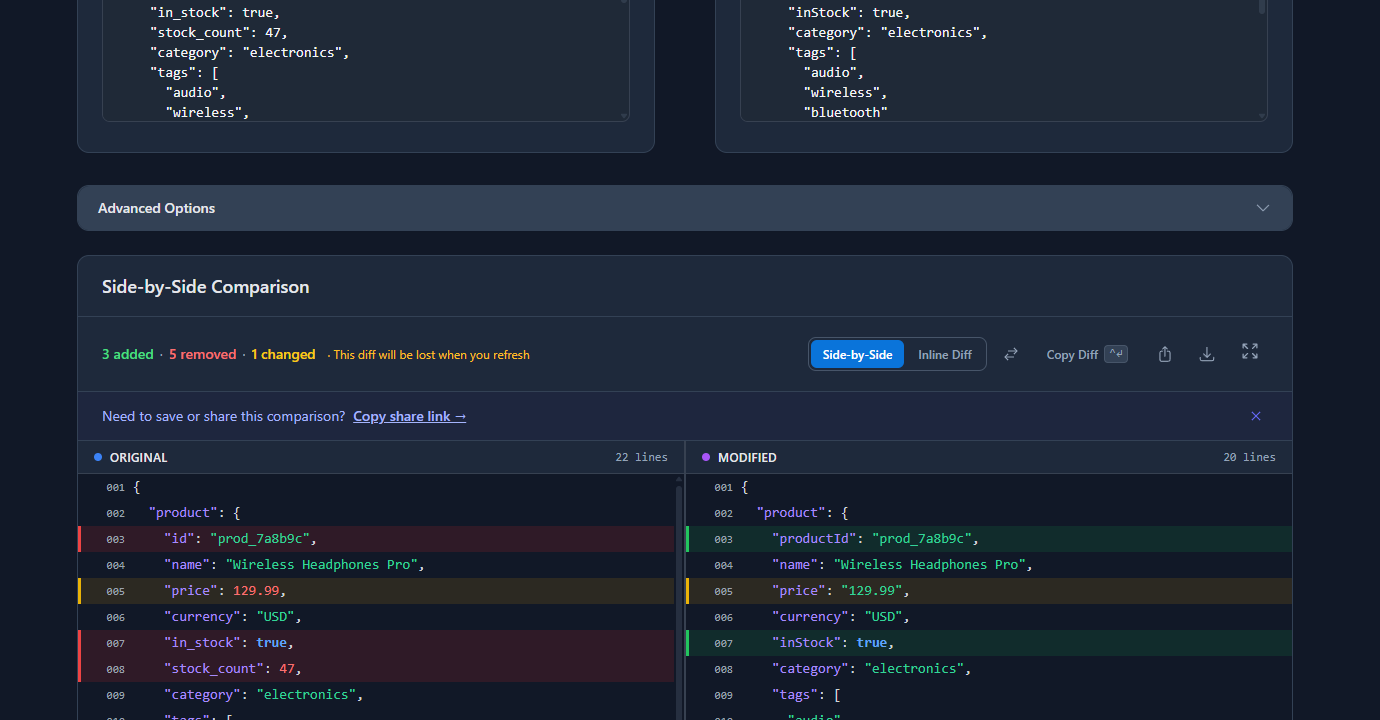
How to catch it: A structural JSON diff flags field renames immediately — one side shows the old key removed, the other shows the new key added. In the example below, id became productId, in_stock became inStock, stock_count was removed entirely, created_at became createdAt:
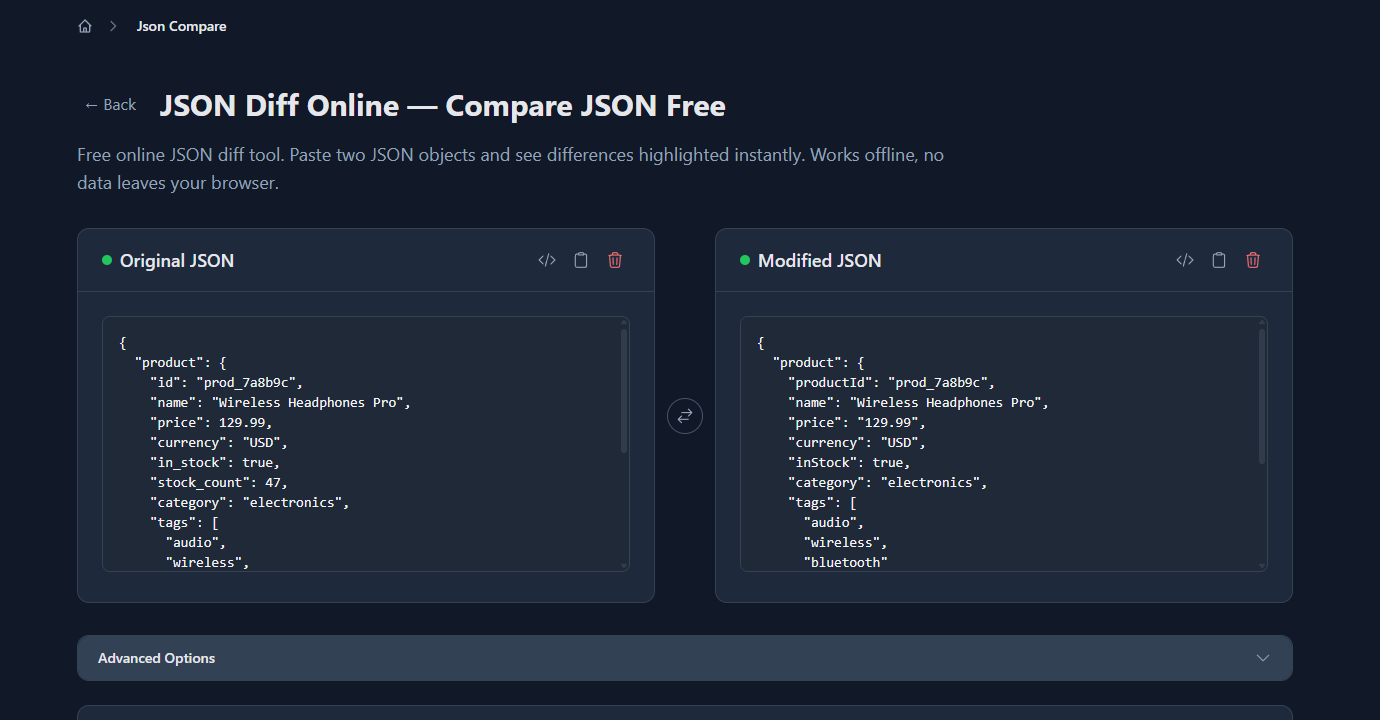
How to prevent it: If you must rename a field, keep the old one as a deprecated alias for at least one version cycle. Document it in a changelog. And if you’re consuming a third-party API, save the response shape before any announced deprecation so you have a before/after to compare.
Mistake 2: Type changes that break arithmetic and comparisons
price: 129.99 (number) becomes price: "129.99" (string). It looks identical in a log output. But product.price * 1.1 returns NaN in JavaScript, and price > 100 is false because JavaScript compares a string to a number using string ordering.
Why it happens: A database query changes and the ORM returns the decimal as a string. A new serialisation library formats numbers differently. A microservice was rewritten and the new version uses a different type mapping.
How to catch it: A semantic JSON diff flags type changes even when the displayed value looks the same. "129.99" and 129.99 are not equal — one is a string, one is a number. A text diff won’t notice; a structural diff will.
In code, add type checks to your API response validation:
// ❌ Assumes price is always a number
const total = response.price * quantity;

// ✅ Validate the type, fail loudly if wrong
if (typeof response.price !== 'number') {
  throw new Error(`Expected price to be a number, got ${typeof response.price}`);
}
const total = response.price * quantity;
This is particularly important for fields used in calculations, comparisons, or conditionals. If in_stock: true becomes in_stock: "true", the string "true" is truthy in JavaScript — so that specific mistake won’t break the conditional, but it will break a strict comparison like response.in_stock === true.
Mistake 3: Ignoring error response shapes
Many developers check for a non-2xx status code and stop there. But some APIs return 200 with an error body:
{
  "status": "error",
  "message": "Product not found",
  "code": "PRODUCT_404"
}
And conversely, some APIs return structured error objects on 4xx/5xx that your error handler doesn’t parse:
// ❌ Only checks status, discards error detail
if (!response.ok) {
  throw new Error('API request failed');
}

// ✅ Parses the error body for context
if (!response.ok) {
  const error = await response.json().catch(() => null);
  throw new Error(error?.message ?? `API error ${response.status}`);
}
The subtler problem: APIs that return different error shapes depending on which layer rejected the request. A 401 from your API gateway might be a plain HTML page. A 401 from your application layer might be a JSON object with {"error": "token_expired"}. If your error handler assumes JSON on every non-200, it will throw a JSON parse error instead of the original error — making debugging harder.
Always log or inspect the raw response body when an unexpected error occurs, before assuming the structure.
Mistake 4: Using 200 for everything
Some APIs — especially older ones or those built without strict HTTP semantics — use 200 OK for every response, including errors. This forces clients to inspect the body to determine success or failure, which is fragile and non-standard.
More commonly, developers building new APIs use the wrong status codes:
| Situation | Wrong code | Right code |
|---|---|---|
| Resource created | 200 | 201 Created |
| Successful DELETE | 200 | 204 No Content |
| Validation error | 500 | 422 Unprocessable Entity |
| Missing auth header | 403 | 401 Unauthorized |
| Forbidden resource | 401 | 403 Forbidden |
The 401 vs 403 distinction matters especially: 401 means “I don’t know who you are — authenticate first.” 403 means “I know who you are, but you don’t have permission.” If you return 401 when you mean 403, clients will try to re-authenticate unnecessarily instead of checking permissions.
How to audit your status codes: Use curl -s -o /dev/null -w "%{http_code}" to check the code for different scenarios:
# Check what status code a missing resource returns
curl -s -o /dev/null -w "%{http_code}" \
  https://api.example.com/products/nonexistent-id \
  -H "Authorization: Bearer $TOKEN"
# Should return 404, not 200 or 500
Mistake 5: Not handling pagination consistently
Pagination is one of the most inconsistent parts of REST API design. Common mistakes:
Missing total count: The client can’t know how many pages exist without a total. Include total, count, or has_more in every paginated response:
{
  "data": [...],
  "pagination": {
    "page": 1,
    "per_page": 20,
    "total": 247,
    "has_more": true
  }
}
Changing the key name between endpoints: One endpoint uses data, another uses items, another uses results. Pick one and use it everywhere — inconsistency forces clients to handle multiple shapes.
Off-by-one on page numbering: Some APIs use 0-indexed pages, others use 1-indexed. Document it explicitly. If you return an empty array for page 0 on a 1-indexed API, the client will silently believe there’s no data.
Mistake 6: Not versioning the API
No versioning means every breaking change is a forced migration. When you rename user_id to userId in an unversioned API, every client breaks simultaneously. With versioning, you can maintain /v1/users (old shape) and /v2/users (new shape) and migrate clients incrementally.
The minimal versioning approach that avoids most pain:
# URI versioning — explicit and cacheable
GET /v1/products/prod_123
GET /v2/products/prod_123

# Header versioning — cleaner URLs but less obvious
GET /products/prod_123
API-Version: 2
URI versioning is simpler to understand, debug, and cache. Header versioning requires documentation that clients actually read.
Catching these mistakes systematically
Before deploying any API change:
- Save the current response shape:
curl -s URL | jq --sort-keys . > before.json - Deploy the change
- Save the new response:
curl -s URL | jq --sort-keys . > after.json - Diff them:
diff before.json after.json
For a visual view of the diff, paste both into gogood.dev/json-compare. The structural comparison catches field renames, type changes, and missing keys in one pass.
In CI — validate the response shape automatically:
#!/bin/bash
# Check that API response matches expected shape
ACTUAL=$(curl -s "$API_URL/products/prod_test" \
  -H "Authorization: Bearer $CI_TOKEN" \
  | jq --sort-keys 'del(.updated_at)')

EXPECTED=$(jq --sort-keys . fixtures/product-response.json)

if [ "$ACTUAL" != "$EXPECTED" ]; then
  echo "❌ API response shape changed unexpectedly"
  diff <(echo "$EXPECTED") <(echo "$ACTUAL")
  exit 1
fi
Run this on every deploy to staging. Catches regressions before they reach production.
FAQ
What are the most common REST API mistakes?
The most common are: silent field renames (snake_case to camelCase, or outright new names), type changes (number becoming string or vice versa), using incorrect HTTP status codes (200 for errors, 401 vs 403 confusion), not handling paginated responses consistently, and making breaking changes without versioning. Most of these are invisible until client code breaks.
How do I catch REST API breaking changes before deploying?
Save the API response before deploying with curl -s URL | jq --sort-keys . > before.json, deploy, then save again and run diff before.json after.json. For visual comparison, paste both responses into gogood.dev/json-compare. A structural diff catches renames and type changes that a text diff misses.
What’s the difference between 401 and 403?
401 Unauthorized means the request lacks valid authentication — the server doesn’t know who you are. 403 Forbidden means authentication succeeded but the authenticated user doesn’t have permission to access the resource. Returning 401 when you mean 403 causes clients to unnecessarily retry authentication.
Should I version my REST API?
Yes, if you expect to make breaking changes (field renames, type changes, removing fields). URI versioning (/v1/, /v2/) is the simplest approach — it’s explicit, works with caching, and is easy to document. Without versioning, every breaking change forces all clients to migrate simultaneously.
How do I detect type changes in API responses?
A structural JSON diff tool compares types, not just string representations — it flags "129.99" (string) vs 129.99 (number) as different even though they look identical in a log. In code, add explicit typeof checks on fields used in calculations or strict comparisons.
Most common REST API mistakes are detectable before they reach users — but only if you’re comparing the right things. A before/after response comparison catches the silent regressions that status codes and HTTP errors don’t surface.
For the full debugging workflow: How to Debug REST API Responses Like a Senior Dev covers the complete process from status codes to body inspection. Comparing API Responses Before and After a Deploy goes deeper on the capture-and-diff workflow that catches these mistakes systematically.