Comparing API Responses Before and After a Deploy
How to compare API responses before and after a deploy to catch breaking changes early — curl + jq workflow, visual diff tools, and CI automation.
You deploy a change. The API still returns 200. The frontend still loads. But somewhere downstream, a field that used to be a string is now a number, or a nested object silently disappeared. You find out three days later when a customer reports a bug.
The fix is straightforward: compare API responses before and after every deploy. Capture the response shape before you push, deploy, capture it again, and diff them. If the shape changed in a way you didn’t intend, you catch it immediately — before it reaches users.
This post covers the full workflow: manual comparison with curl and jq, visual comparison for ad hoc debugging, and automated comparison in CI so regressions surface on every deploy.
TL;DR: Capture
curl -s URL | jq --sort-keys . > before.json, deploy, captureafter.json, then diff. For a visual comparison, paste both responses into GoGood.dev JSON Compare to see exactly what changed.
What “comparing API responses” means
A response comparison is a structural diff of two JSON payloads — the same endpoint, called at two different points in time (or against two different environments), with the output compared field by field.
The goal isn’t to check whether the data is the same (it won’t be — IDs, timestamps, and user data change). The goal is to check whether the shape is the same: the same fields exist, with the same types, at the same paths.
If user.role was a string before and an array after, that’s a breaking change. If settings.notifications disappeared, that’s a regression. If a new billing object appeared unexpectedly, that might be intentional — or it might not be.
A diff makes all of this visible immediately.
The curl + jq workflow
This is the baseline approach. It works anywhere you have a terminal.
Step 1: Capture the response before deploying
# Save the pre-deploy response
curl -s "https://api.example.com/users/usr_a1b2c3" \
  -H "Authorization: Bearer $TOKEN" \
  | jq --sort-keys . > before.json
The --sort-keys flag normalises key ordering so the diff only shows semantic changes, not JSON key reordering noise.
Step 2: Deploy your change
Run your normal deployment process — staging or production, depending on what you’re verifying.
Step 3: Capture the response after deploying
curl -s "https://api.example.com/users/usr_a1b2c3" \
  -H "Authorization: Bearer $TOKEN" \
  | jq --sort-keys . > after.json
Step 4: Diff the two files
diff before.json after.jsonOr for a more readable output:
diff --unified=2 before.json after.jsonThe --unified=2 flag shows 2 lines of context around each change, making it easier to see what’s near each difference.
Filtering out known-dynamic fields before diffing:
Timestamps and IDs change on every request, so they’ll show up as diffs even when nothing is wrong. Strip them before comparing:
# Remove dynamic fields before saving
curl -s "https://api.example.com/users/usr_a1b2c3" \
  -H "Authorization: Bearer $TOKEN" \
  | jq --sort-keys 'del(.last_login, .updated_at, .request_id)' > before.json
This keeps the structural comparison clean.
Visual comparison for ad hoc debugging
For a quick comparison during development, paste both responses into GoGood.dev JSON Compare. Paste the before state on the left and the after state on the right — the diff runs immediately:
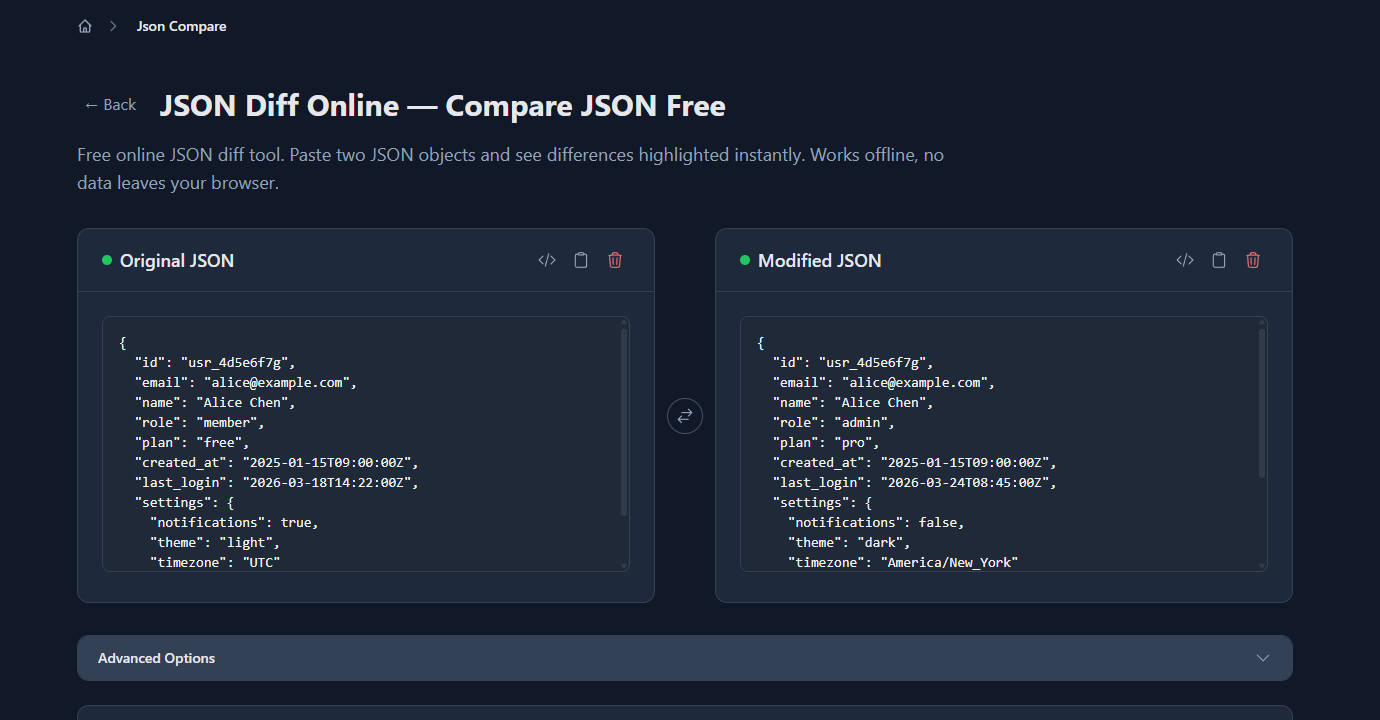
The diff highlights every field that changed, was added, or was removed. In the example above — the same /users/:id endpoint before and after a deploy — the tool shows role, plan, last_login, and settings fields changed, plus a new billing object added:
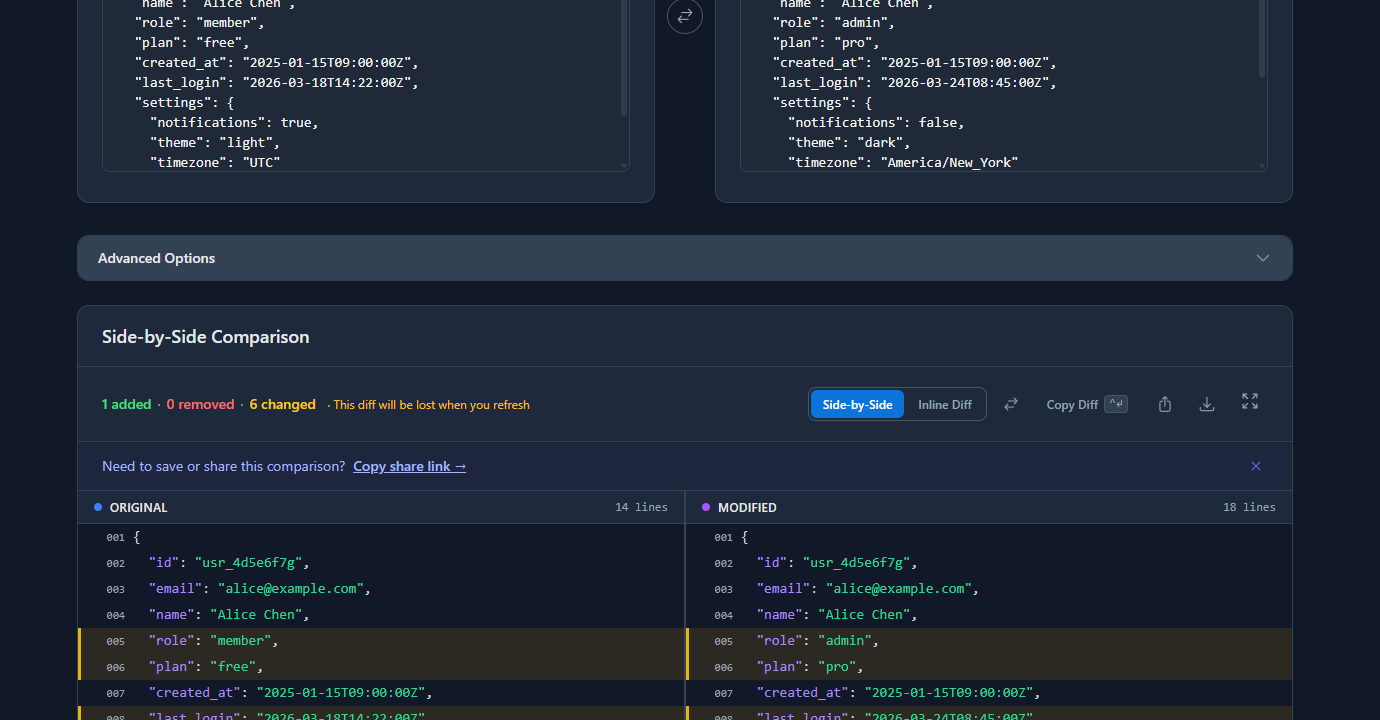
This is useful when you’re debugging a specific regression and want to understand exactly what changed without running CLI commands. The “Ignore Array Order” option removes ordering noise if your API returns lists in different sequences.
Automating the comparison in CI
Manual comparison is good for development. For production confidence, automate it so every deploy runs the check automatically.
Save a known-good response as a fixture:
# Run once — save the expected response shape
curl -s "https://staging.api.example.com/users/usr_test" \
  -H "Authorization: Bearer $CI_TOKEN" \
  | jq --sort-keys 'del(.last_login, .updated_at)' > fixtures/users-get.json
Check this file into your repository. It’s your contract for what the endpoint should return.
CI script that fails on shape change:
#!/bin/bash
# scripts/check-api-response.sh

ACTUAL=$(curl -s "https://staging.api.example.com/users/usr_test" \
  -H "Authorization: Bearer $CI_TOKEN" \
  | jq --sort-keys 'del(.last_login, .updated_at)')

EXPECTED=$(jq --sort-keys . fixtures/users-get.json)

if [ "$ACTUAL" != "$EXPECTED" ]; then
  echo "❌ API response shape changed:"
  diff <(echo "$EXPECTED") <(echo "$ACTUAL")
  exit 1
fi

echo "✅ API response matches fixture"
Add this to your GitHub Actions workflow:
# .github/workflows/api-check.yml
- name: Check API response shape
  run: bash scripts/check-api-response.sh
  env:
    CI_TOKEN: ${{ secrets.CI_TOKEN }}
This runs on every deploy and fails the pipeline if the response shape changes unexpectedly. It’s a lightweight contract test with no dependencies beyond curl and jq.
Updating fixtures intentionally:
When you intentionally change the API shape (adding a new field, renaming one), update the fixture:
curl -s "https://staging.api.example.com/users/usr_test" \
  -H "Authorization: Bearer $CI_TOKEN" \
  | jq --sort-keys 'del(.last_login, .updated_at)' > fixtures/users-get.json

git add fixtures/users-get.json
git commit -m "chore: update users endpoint fixture — add billing field"
The commit message documents the intentional change. Future diffs will be clean.
Comparing across environments
The same workflow applies to staging vs production comparisons. Call the same endpoint in both environments and diff the responses:
curl -s "https://staging.api.example.com/products/prod_123" \
  -H "Authorization: Bearer $STAGING_TOKEN" \
  | jq --sort-keys 'del(.updated_at)' > staging.json

curl -s "https://api.example.com/products/prod_123" \
  -H "Authorization: Bearer $PROD_TOKEN" \
  | jq --sort-keys 'del(.updated_at)' > prod.json

diff staging.json prod.json
If staging and production diverge in structure, that’s a deployment gap — either a migration ran on one environment but not the other, or configuration is different between them.
Common problems and how to fix them
The diff is full of timestamp noise
Every response includes fields like last_login, updated_at, request_id that change on every call. Strip them with jq’s del() before saving:
jq --sort-keys 'del(.last_login, .updated_at, .request_id)' response.json > cleaned.jsonBuild a list of known-dynamic fields for your API and strip them consistently.
The diff shows array order changes, not real changes
If your API returns a list of permissions or tags in a different order after a query change, diff flags every element even though nothing semantically changed. Fix it in jq before comparing:
jq --sort-keys '.tags |= sort' response.jsonOr use the “Ignore Array Order” option in an online JSON diff tool.
You forgot to save the before state
This is the most common problem. If you didn’t save before.json before deploying, you’re trying to reconstruct what the response used to look like from memory or logs — which is slow and error-prone.
Build the habit: before any deploy that touches an API, run the curl capture first. It takes five seconds and saves hours of debugging.
The fixture is too strict — it fails on valid data changes
If your fixture includes actual data values (user counts, prices), it’ll fail whenever that data changes, even if the structure is fine. Keep fixtures structural: strip all volatile values, keep only the fields whose presence and type you actually care about.
FAQ
How do I compare API responses before and after a deploy?
Capture the response before deploying with curl -s URL | jq --sort-keys . > before.json, deploy your change, capture again to after.json, then run diff before.json after.json. Strip dynamic fields like timestamps with jq’s del() before comparing to avoid noise.
What’s the fastest way to visually compare two API responses?
Paste both JSON responses into an online diff tool like gogood.dev/json-compare. It highlights added, removed, and changed fields immediately — no CLI setup required. Useful for ad hoc debugging when you have both responses in front of you.
How do I compare staging and production API responses?
Call the same endpoint on both environments, save each to a file with jq --sort-keys . > env.json, and run diff staging.json prod.json. Strip environment-specific fields like IDs and timestamps before comparing so the diff only shows structural differences.
How do I automate API response comparison in CI?
Save a known-good response as a fixture JSON file in your repo. In CI, call the endpoint, strip dynamic fields with jq, and compare against the fixture. If they differ, fail the build and print the diff. This catches unintentional API shape changes on every deploy without a full testing framework.
Should I compare the full response or just the structure?
Structure is what matters for catching regressions — field presence, types, and paths. Actual values will vary between calls. Strip volatile fields (timestamps, IDs, computed counts) and compare the shape. If a field changes type from string to number, or a nested key disappears, the structural diff will catch it.
Comparing API responses before and after deploys turns invisible regressions into visible diffs. The curl + jq + diff workflow requires no special tools, runs anywhere, and takes less than a minute to set up. Automate it in CI and you’ll catch breaking changes before users do.
For more on the debugging workflow: How to Debug REST API Responses Like a Senior Dev covers the full response debugging process from status codes to body inspection. Common REST API Mistakes (and How to Catch Them) goes deeper on the failure patterns that API comparisons surface.