How to Test API Changes Without Breaking Production
How to test API changes safely — staging environments, response shape validation, feature flags, canary deploys, and the response comparison workflow that catches regressions early.
Every API change is a potential regression. A field rename breaks a client. A type change silently corrupts a calculation. A removed field causes a null reference three API calls downstream. You can’t know until something breaks — unless you have a deliberate workflow for validating API changes before they reach production.
This post covers the practical techniques for testing API changes safely: staging environment comparison, response shape validation, feature flags for gradual rollouts, and the before/after diff workflow that makes regressions visible immediately instead of days after deploy.
TL;DR: Before deploying any API change, capture the current response shape with
curl -s URL | jq --sort-keys . > before.json. After deploying to staging, capture again and diff. Paste both into GoGood.dev JSON Compare to see every structural change at a glance.
The core principle: compare before you deploy
The most reliable way to test API changes safely is to compare responses — not just check that requests succeed. A 200 status code with a silently broken body is worse than an explicit error, because the client doesn’t know to retry or alert.
The comparison workflow:
- Capture the current response from the endpoint you’re changing
- Make the change in a staging environment
- Capture the new response from staging
- Diff the two — every change is either expected (documented) or a regression
This sounds obvious, but most teams skip step 1 and only test that the new behavior works — not that nothing else broke.
Staging environment: the safety layer
Every API change should be deployed to staging before production. Staging should mirror production as closely as possible:
- Same database schema (different data)
- Same environment variables (different values for external services)
- Same infrastructure (containers, load balancers, caching)
The key habit: test against staging using the same requests you’d make against production. If you change the invoices endpoint, hit it in staging with the same parameters you use in prod, not just a happy-path test case.
Comparing staging vs production responses:
# Capture production (current behaviour)
curl -s "https://api.example.com/invoices/inv_9a8b7c" \
  -H "Authorization: Bearer $PROD_TOKEN" \
  | jq --sort-keys . > prod-before.json

# Capture staging (new behaviour)
curl -s "https://staging.api.example.com/invoices/inv_9a8b7c" \
  -H "Authorization: Bearer $STAGING_TOKEN" \
  | jq --sort-keys . > staging-after.json

# Diff
diff prod-before.json staging-after.json
For a visual diff, paste both responses into GoGood.dev JSON Compare:
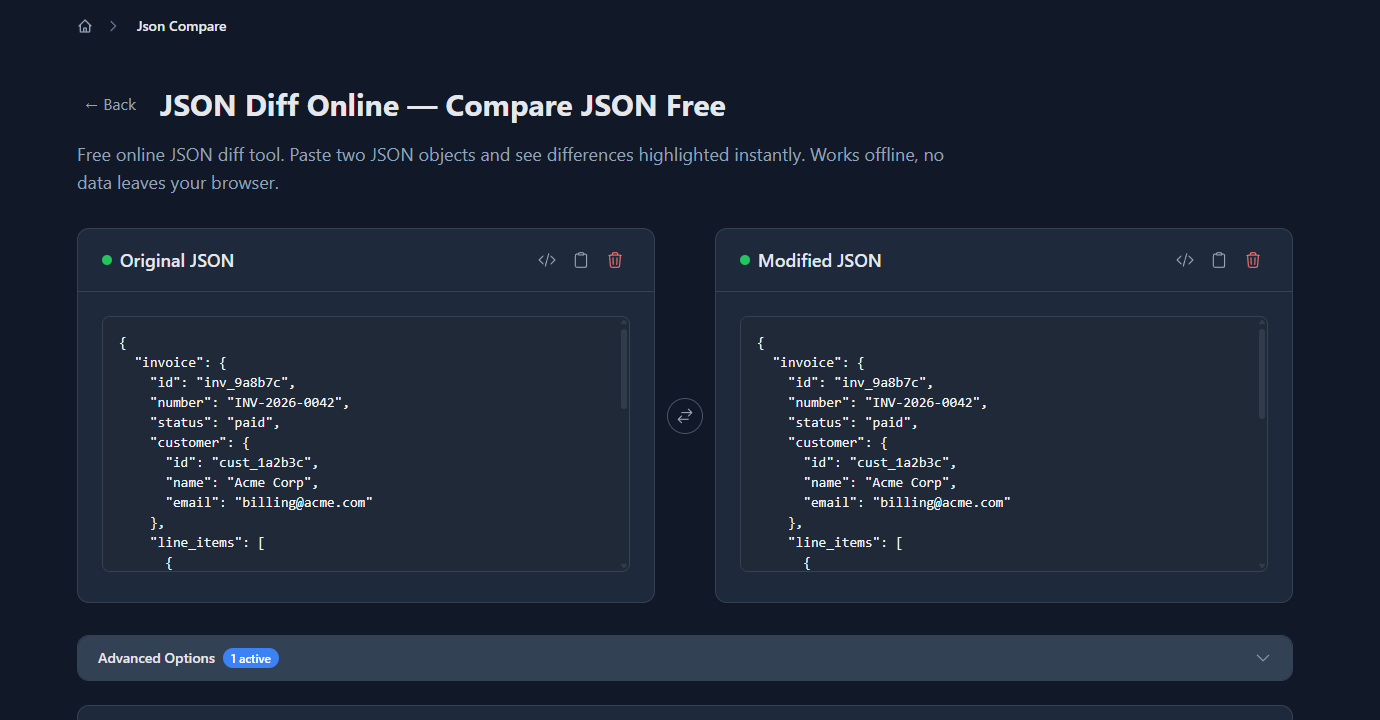
The diff surfaces every difference between staging and production — in this example, field renames in line_items (quantity → qty, unit_price → price), a structural change to the tax field, a currency case difference, and a missing due_date:
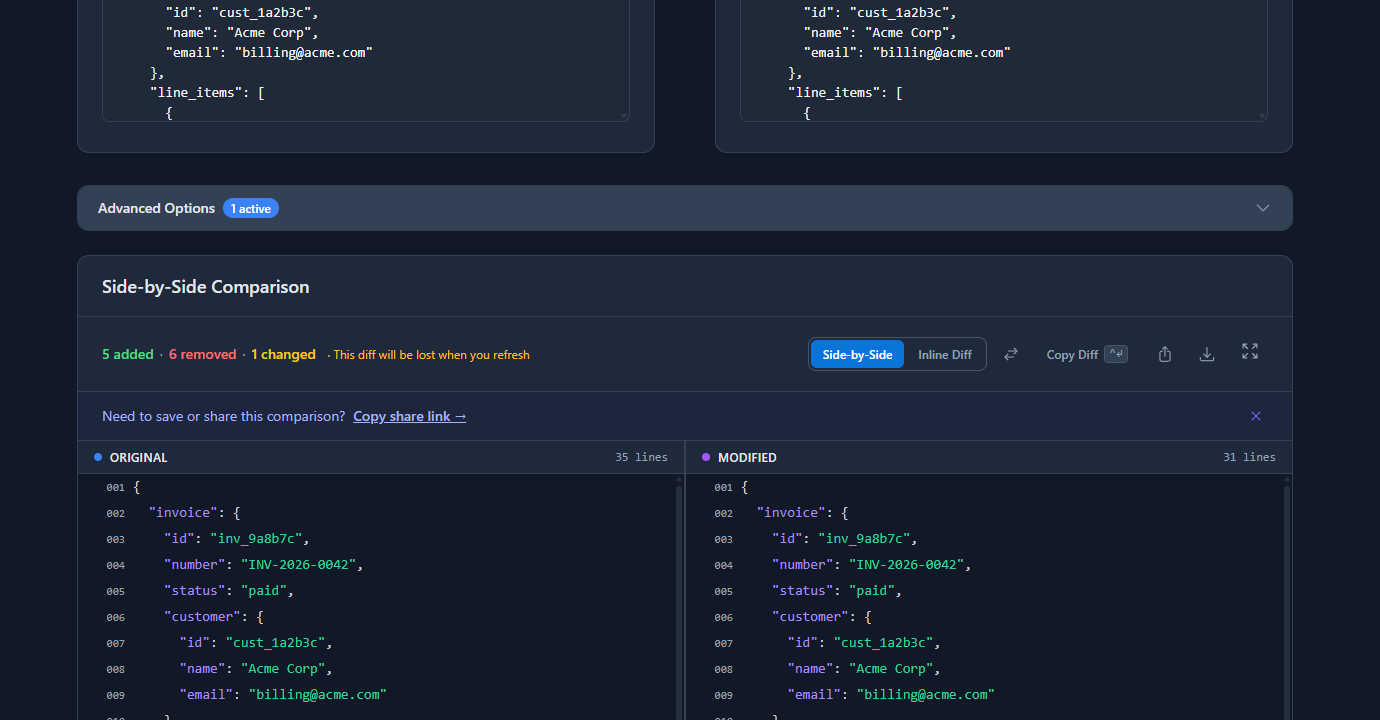
Each difference is either intentional (part of the change you made) or a regression (something you didn’t intend to change). The diff makes both visible immediately.
Response shape validation in CI
Manual comparison works for ad hoc testing. For automated safety, add response shape validation to your CI pipeline so every deploy is checked automatically.
Save a fixture of the expected response:
# Run once — save the good response as a fixture
curl -s "https://staging.api.example.com/invoices/inv_test" \
  -H "Authorization: Bearer $STAGING_TOKEN" \
  | jq --sort-keys 'del(.paid_at, .created_at)' > fixtures/invoice-get.json
The del() removes timestamp fields that change on every call. Check this file into your repository.
CI check on every deploy:
#!/bin/bash
# scripts/validate-api-shape.sh

ACTUAL=$(curl -s "https://staging.api.example.com/invoices/inv_test" \
  -H "Authorization: Bearer $STAGING_TOKEN" \
  | jq --sort-keys 'del(.paid_at, .created_at)')

EXPECTED=$(jq --sort-keys . fixtures/invoice-get.json)

if [ "$ACTUAL" != "$EXPECTED" ]; then
  echo "❌ Invoice API shape changed:"
  diff <(echo "$EXPECTED") <(echo "$ACTUAL")
  exit 1
fi

echo "✅ Invoice API shape matches fixture"
Wire it into GitHub Actions:
# .github/workflows/api-shape.yml
on:
  push:
    branches: [main, staging]

jobs:
  validate-api:
    runs-on: ubuntu-latest
    steps:
      - uses: actions/checkout@v4
      - name: Deploy to staging
        run: ./scripts/deploy-staging.sh
      - name: Validate API shape
        run: bash scripts/validate-api-shape.sh
        env:
          STAGING_TOKEN: ${{ secrets.STAGING_TOKEN }}
Now every push that changes the API gets automatically validated against the fixture. If the shape changes unintentionally, the build fails before anyone touches production.
Feature flags for gradual API rollouts
Some API changes are too significant to validate fully in staging — they need real production traffic to surface edge cases. Feature flags let you deploy the change to production but only activate it for a subset of requests.
Basic feature flag in an API handler:
// Feature flag check
const useNewInvoiceSchema = process.env.NEW_INVOICE_SCHEMA === 'true'
  || request.headers['x-feature-flags']?.includes('new-invoice-schema');

if (useNewInvoiceSchema) {
  return formatInvoiceV2(invoice);
} else {
  return formatInvoiceV1(invoice);
}
Gradual rollout with a percentage flag:
// Roll out to 10% of requests initially
const rolloutPercentage = parseInt(process.env.NEW_SCHEMA_ROLLOUT ?? '0', 10);
const useNewSchema = (Math.random() * 100) < rolloutPercentage;
Start at 1%, watch error rates and response times, increment to 10%, 50%, 100% over hours or days. If anything goes wrong, set the percentage to 0 — instant rollback without a deploy.
Shadow mode — run both versions, compare silently:
For high-stakes changes, run the old and new code paths simultaneously, compare their outputs, and log any differences without changing what clients receive:
const [oldResult, newResult] = await Promise.all([
  formatInvoiceV1(invoice),
  formatInvoiceV2(invoice)
]);

if (JSON.stringify(oldResult) !== JSON.stringify(newResult)) {
  logger.warn('Invoice schema mismatch in shadow mode', {
    invoice_id: invoice.id,
    diff: computeDiff(oldResult, newResult)
  });
}

// Always return the old result to clients
return oldResult;
Shadow mode gives you real production data to validate the new behavior against, with zero risk to clients.
Canary deploys
A canary deploy routes a small percentage of production traffic to the new version of the service. Unlike feature flags (which live in code), canary deploys operate at the infrastructure level — a load balancer routes 5% of requests to the new instance and 95% to the old.
Most cloud platforms support this natively:
# Example: AWS CodeDeploy canary configuration
deploymentConfig:
  type: TimeBasedCanary
  canaryPercentage: 10        # start with 10% of traffic
  canaryInterval: 10          # wait 10 minutes
  # If no alarms trigger, complete the deployment
The key is defining the alarms that trigger an automatic rollback: error rate spike, latency increase, or response shape changes detected by a monitoring script.
Common problems when testing API changes
“Staging and production diverged but we didn’t notice”
Staging drift happens when production receives hotfixes that don’t get backported to staging, or when staging database migrations fall behind. Fix: treat staging like production — require PRs to merge to staging before production, and run the same deploy pipeline.
“Our tests pass in staging but fail in production”
Production has different data. A test that works with the staging invoice might fail with a production invoice that has a different structure (older records, different plan types, edge cases). Add edge-case fixtures to your CI tests based on real production examples that have caused bugs before.
“We can’t test without impacting real users”
Use a dedicated test account in production (clearly marked, never billed) for API validation. Or use shadow mode — run the new code path in production but only for logging, never for client responses. This gives you real production data without risk.
“The diff shows too many changes — we can’t tell what’s intentional”
Document intentional changes first. Before making the change, write down exactly what fields you’re adding, removing, or modifying. Then run the diff — if the only differences match your documentation, you’re clean. Any extras are regressions.
FAQ
How do I test API changes without breaking production?
The core workflow: capture the current response with curl -s URL | jq --sort-keys . > before.json, make the change in staging, capture again, and diff. Add automated response shape validation to CI so every deploy is checked against a saved fixture. For risky changes, use feature flags to control rollout percentage or shadow mode to validate in production without affecting clients.
What’s the difference between feature flags and canary deploys for API changes?
Feature flags live in code — they control which code path runs based on conditions you define (user ID, percentage, header). Canary deploys live in infrastructure — the load balancer routes a percentage of traffic to a different version of the whole service. Feature flags are more flexible for per-request control; canary deploys are better for infrastructure-level changes.
How do I compare staging and production API responses?
Call the same endpoint in both environments, save each response with jq --sort-keys . > file.json, and run diff staging.json prod.json. For a visual comparison, paste both into gogood.dev/json-compare. Strip dynamic fields (timestamps, request IDs) with jq 'del(.updated_at)' before comparing to avoid noise.
How do I roll back an API change that broke production?
If you used a feature flag, set the flag to 0% or false — instant rollback, no deploy needed. If you used a canary deploy, trigger the rollback in your deployment tool (CloudDeploy, Kubernetes rollout undo). If neither, revert the code change and deploy the revert. The fastest rollback is always a feature flag — it’s why high-stakes changes should always be flag-gated.
How do I know if an API change is safe to deploy?
Safe criteria: the response shape diff between staging and production matches your documented intentions exactly, CI response shape validation passes, error rates and latency are stable in staging under load, and edge cases (empty arrays, null fields, very old records) have been tested. If any of these are uncertain, use a canary deploy rather than a full cutover.
Testing API changes safely is mostly a discipline problem, not a tooling problem. The tools are simple — curl, jq, diff, and a CI script. The discipline is: always capture before, always validate the shape, always deploy gradually for breaking changes.
For the full debugging toolkit: How to Debug REST API Responses Like a Senior Dev covers the complete response debugging workflow, and Common REST API Mistakes and How to Catch Them documents the specific changes that most often cause production regressions.